
Self-Hosted Project Management Software for Software Development in 2026: 6 Tools, Agile Features, and On-Premise Deployment
What is self-hosted project management software for software development?
Self-hosted project management software for software development is an application installed on the customer’s own infrastructure — on-premise server, private cloud, Windows VPS, or air-gapped LAN — that gives engineering teams full custody of issues, sprints, code references, and release plans. Unlike SaaS tools, the database, file storage, and authentication layer all sit inside the organization’s network perimeter (UI Bakery, 2026).
Three technical characteristics separate self-hosted tools from cloud counterparts:
- Data sovereignty: source code references, issue metadata, and customer information never leave the corporate firewall.
- Deep customization: open-source codebases (Redmine, OpenProject, Taiga, GitLab CE) allow plugin development and UI modification; commercial self-hosted tools like Kendo Manager expose configuration layers without source modification.
- Predictable cost model: a perpetual license replaces per-user monthly fees, which changes 5-year total cost of ownership in favor of self-hosting for teams above ~25 users.
Why do 43% of teams choose self-hosted project management over SaaS in 2026?
Worklenz industry data shows that 43% of businesses using self-hosted project management tools report higher team productivity and tighter workflows compared with their previous SaaS setup (Worklenz, 2024). The four drivers behind the shift are data ownership, compliance, performance, and predictable licensing.
How does on-premise deployment protect source code and intellectual property?
On-premise deployment keeps proprietary code references, ticket descriptions, and architectural diagrams behind the company firewall, eliminating third-party access to repository metadata. For ISO/IEC 27001 audits and SOC 2 Type II programs, this removes an entire vendor from the data-flow diagram, which shortens scoping and reduces sub-processor risk. EU customers gain an additional benefit: keeping personal data inside the EU border simplifies GDPR Article 44 transfer assessments.
What workflow customizations does self-hosting allow for DevOps and agile teams?
Self-hosting allows engineering teams to bind the project management layer to internal systems — Git servers, CI runners, identity providers, Slack-equivalent chat, and custom issue schemas — without depending on a vendor roadmap. Three concrete customization vectors:
- Schema control: custom fields for severity, affected component, and reproduction steps integrated into bug workflow.
- Pipeline integration: webhook triggers from a self-managed GitLab or Jenkins instance update ticket states automatically on successful builds.
- Permission isolation: project visibility split between client-facing tickets and internal engineering notes inside the same instance.
How do long-term costs compare between self-hosted and SaaS over 5 years?
Over a 5-year horizon, a self-hosted tool with a one-time license usually costs 40–70% less than an equivalent SaaS subscription for teams of 25 users or more, because subscription fees compound while perpetual licenses amortize. A 50-seat SaaS plan at $10/user/month equals $30,000 across 5 years; an equivalent perpetual self-hosted license — Kendo Manager’s licensing model is one example — replaces that with a single upfront payment plus an optional yearly support renewal (Kendo Manager pricing).
Which 6 self-hosted project management tools rank highest for software development in 2026?
Six tools dominate self-hosted project management for software development in 2026: Kendo Manager, OpenProject, GitLab CE, Plane, Taiga, and Redmine. The table below compares deployment model, primary methodology fit, and licensing.
| Tool | License | Primary Methodology | Best Fit | Deployment Stack |
|---|---|---|---|---|
| Kendo Manager | Perpetual (commercial) | Hybrid (Agile + Waterfall) | SMB and mid-market dev teams | IIS, .NET 4+, MariaDB 10.1–10.5 |
| OpenProject | GNU GPL v3 (open source) | Hybrid | Regulated EU enterprises | Docker / Linux packages |
| GitLab CE | MIT (open source) | DevOps end-to-end | Teams needing PM + Git + CI/CD | Omnibus, Helm, Docker |
| Plane | Apache 2.0 (open source) | Agile (Issues/Cycles/Modules) | Startups, product engineering | Docker / Kubernetes one-liner |
| Taiga | MPL 2.0 (open source) | Scrum / Kanban | Pure-agile small teams | Docker / Python stack |
| Redmine | GNU GPL v2 (open source) | Issue tracking / Waterfall | Legacy Ruby on Rails shops | Ruby, Rails, MySQL/PostgreSQL |
How does Kendo Manager fit software development workflows?
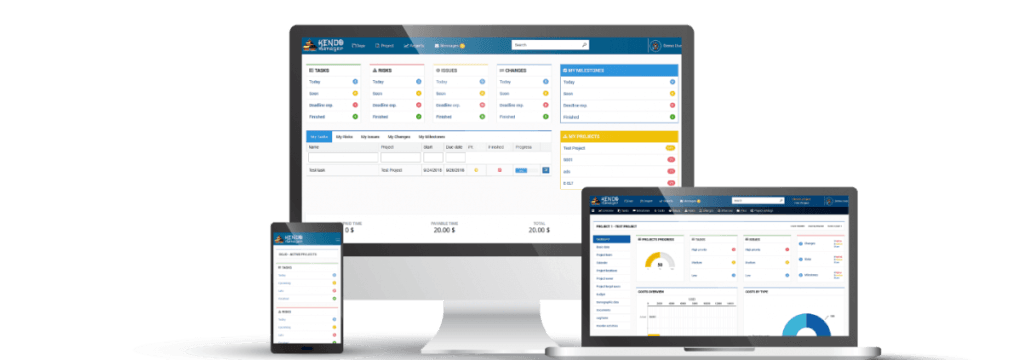
Kendo Manager handles software development workflows through three integrated views — interactive Gantt chart, Kanban board, and detailed task list — backed by issue tracking, time tracking, cost reporting, resource management, risk management, and change management modules across every license tier (Kendo Manager features). The product was built by Spider Soft starting in 2010 to align with PMI standards while staying affordable for non-enterprise budgets (Spider Soft / Kendo Manager about page).

Three properties stand out for software development teams:
- Unified module set: time tracking, costs, issue tracking, and risk management are bundled at every price tier — competitors split these across add-ons.
- Built-in migration: an import feature transfers projects, tasks, and resources from existing systems with minimal manual mapping.
- GDPR-aligned hosting: install on a company-controlled Windows server keeps personal data inside the customer’s EU jurisdiction.
What makes OpenProject a strong self-hosted Jira alternative?
OpenProject is a strong Jira alternative because it is GPL v3 open source, developed in Germany under strict EU data-protection rules, and ships with agile boards, Gantt charts, time tracking, budgeting, and a wiki in its free Community Edition (OpenProject). With Atlassian ending support for self-hosted Jira and Confluence by March 2029, OpenProject has positioned itself as the default migration target for EU teams (Plane, 2025). The trade-off is a steep learning curve and Docker-based self-hosting that requires DevOps experience.
When should development teams choose Redmine over modern alternatives?
Development teams should choose Redmine only when they already run Ruby on Rails internally and need a heavily plugin-customizable issue tracker with 15+ years of community plugins. Redmine still works for legacy environments, but its UI lacks real-time interactivity and full-page reloads happen on almost every action, which slows daily ticket triage compared with Plane, GitLab, or Kendo Manager.
Why do agile-first teams pick Taiga for Scrum and Kanban?
Agile-first teams pick Taiga because it ships with Scrum boards, Kanban boards, user-story backlogs, sprint planning, burndown charts, and built-in team chat as defaults — no plugins required. Its design is modern and developer-friendly, and the MPL 2.0 license allows commercial self-hosting. The downside is a difficult initial self-hosting setup compared with Plane’s single-command Docker deployment.
How does GitLab combine project management with CI/CD?
GitLab combines project management with CI/CD inside a single self-hosted instance, merging issue boards, milestones, epics, roadmaps, and wikis with Git repository hosting and pipeline runners. The Community Edition is free under MIT licensing and runs via Omnibus, Helm, or Docker. Premium features such as advanced security scanning and compliance dashboards start at $19/user/month on the self-managed Premium tier and go up to $99/user/month on Ultimate. GitLab suits teams that want a single tool to cover plan, code, build, and deploy — at the cost of significant server resources.
What positions Plane as a developer-focused option?
Plane positions itself as a Jira-and-Linear-style alternative for developers, with issues, cycles, modules, and views as primary entities. Launched in 2023, it has crossed 31,000 GitHub stars and runs a one-line Docker or Kubernetes self-hosted setup with 100% feature parity between cloud and self-hosted editions. Plane is heavily tuned for engineering workflows and is less practical for construction or general-business project management that relies on traditional Gantt-and-Waterfall planning.
Which 12 features matter most for agile development in self-hosted tools?
Twelve features separate production-ready self-hosted project management tools from incomplete ones for agile software development teams in 2026:
- Kanban boards with WIP limits and swimlanes for parallel workstreams.
- Scrum boards with sprint backlog, burndown chart, and velocity tracking.
- Gantt charts for release roadmaps and dependency mapping across sprints.
- Issue tracking with custom severity, priority, and component fields.
- Time tracking at task level for billing and capacity planning.
- Resource management for personnel, materials, and external contractors.
- Cost and budget control with planned-vs-actual comparison.
- Risk register linked to tasks and mitigations.
- Change management log for scope adjustments and approvals.
- Version-control integration (Git, SVN) with commit-to-ticket linking.
- Granular role permissions per project and per module.
- Dashboard reporting with sprint, cost, and risk views in one screen.
Kendo Manager covers all 12 inside the standard license, with no separate add-on purchases (Kendo Manager modules).
How does Kendo Manager handle resource, cost, and risk management for development teams?
Kendo Manager handles resource, cost, and risk management through four interconnected modules — resource allocation, time tracking, budget control, and risk register — all sharing the same project database. Project managers assign role-level permissions, adjust resource levels in real time across personnel, materials, and facilities, and pull every record into a single project dashboard (Kendo Manager features).
The integrated time-tracking tool records hours per task, which feeds three downstream uses: client billing, sprint capacity analysis, and historical estimation for future releases. Budget control compares planned cost against actuals in real time and flags critical thresholds before they breach the contracted ceiling. The risk module ties each registered risk to a specific task and mitigation owner, so risk status is visible inside the same view where the task is updated — not in a separate spreadsheet.

What technical and licensing requirements affect self-hosted Kendo Manager deployments?
Kendo Manager installs on either a local network or online hosting and needs MariaDB 10.1–10.5, IIS, and .NET Framework 4 or later. Supported environments include MS Windows Server, Windows 10 PC for small teams, Windows VPS, and ASP hosting with Plesk Panel (Kendo Manager pricing).
What server specifications does a 20–50 user Kendo Manager instance need?
A 20–50 user Kendo Manager instance runs comfortably on a 4 vCPU / 8 GB RAM Windows Server 2019+ with MariaDB on the same host or on a separate database VM. Storage requirements stay below 50 GB for the first two years of active project data in most installations. Backup strategy should follow a 3-2-1 rule — three copies, two media, one off-site — to protect against ransomware and regional outages.

How does the one-time license model compare with annual subscriptions?
Kendo Manager uses a one-time perpetual license with unlimited projects and full features included across every license edition, plus one year of free updates and technical support that the buyer can extend with an optional renewal (Kendo Manager pricing). The model differs from typical SaaS in three ways:
- Upfront capital expense replaces recurring operating expense (relevant for CapEx-favored accounting).
- Per-feature paywalls are removed — every module is included.
- Support and updates renew yearly but are optional, not mandatory, for continued use.
How do you migrate from Jira Server, Cloud, or another tool to a self-hosted alternative?
Migration from Jira Server or Cloud to a self-hosted alternative follows five stages: export, schema mapping, dry-run import, parallel run, and cutover. Most teams complete the move in 2–6 weeks depending on instance size. Kendo Manager provides a built-in import feature that maps projects, tasks, and resources from existing systems without manual CSV manipulation for each field (Kendo Manager free self-hosted tools page).
Three migration-day risks to plan for:
- Attachment volume: large attachment archives extend import time more than ticket count.
- Custom field collisions: rename overlapping fields in the source before export.
- Permission re-mapping: source group names rarely match destination role names; build a mapping table before import.
Frequently asked questions about self-hosted project management software
What is the best self-hosted project management software for small software development teams?
The best self-hosted project management software for small software development teams in 2026 is Kendo Manager for hybrid Agile/Waterfall teams, Taiga for pure-Scrum teams under 15 people, and Plane for product-engineering startups under 20 people. All three install in under one hour and cover Kanban, Scrum, and basic issue tracking without paid add-ons.
Is self-hosted project management software GDPR compliant by default?
Self-hosted project management software is GDPR-compliant by default for data location and processor scoping when the server resides inside the EU, because no personal data is transferred to an external processor. The customer still owns the controller obligations: lawful basis, retention policies, data-subject request handling, and security measures under GDPR Article 32.
Can self-hosted project management tools replace Jira for software development?
Yes, self-hosted project management tools replace Jira fully for software development when the team picks a methodology-aligned option: OpenProject for enterprise hybrid teams, GitLab for end-to-end DevOps, Plane for modern issue tracking, or Kendo Manager for mixed Agile/Waterfall portfolios. Migration paths exist for all four, and Atlassian’s 2029 self-hosted end-of-support deadline has accelerated the move.
How much does self-hosted project management software cost in 2026?
Self-hosted project management software costs range from $0 (Redmine, Taiga, OpenProject Community, GitLab CE, Plane) to one-time perpetual licenses in the $400–$3,000 range for commercial tools like Kendo Manager (Kendo Manager pricing), and up to $99/user/month for GitLab Ultimate self-managed. Server and admin time add typically $50–$300/month in infrastructure cost depending on scale.
What are the minimum system requirements for running self-hosted project management software?
Minimum system requirements depend on the stack: Kendo Manager needs Windows Server or Windows 10, IIS, .NET Framework 4+, and MariaDB 10.1–10.5; OpenProject and Plane run on Docker with 4 GB RAM minimum; GitLab needs 8 GB RAM and 4 vCPU for a 100-user instance per its official documentation. All five tools support deployment on a single VM for teams below 50 users.
Does self-hosted project management software work for remote and distributed teams?
Self-hosted project management software works for remote and distributed teams as long as the server is reachable over HTTPS, ideally behind a VPN or zero-trust gateway. Kendo Manager exposes role-based permissions, in-system messaging, e-mail notifications, and document sharing inside the project view, which removes the need for external collaboration tools for daily ticket work (Kendo Manager features).
Which self-hosted project management software supports both Agile and Waterfall?
Kendo Manager and OpenProject support both Agile and Waterfall inside the same project, with toggle between Kanban view, Gantt view, and task list. This dual support matters for hybrid teams running engineering sprints inside a fixed-deadline release plan negotiated with the client.
Key takeaways for choosing self-hosted project management software
Selecting self-hosted project management software for software development in 2026 comes down to four decisions: methodology (Agile, Waterfall, or hybrid), licensing model (open source vs perpetual commercial), infrastructure stack (Linux/Docker vs Windows/IIS), and total cost over 5 years. Kendo Manager covers the hybrid + Windows + perpetual-license quadrant with all 12 agile features bundled, GDPR-compatible on-premise hosting, and a built-in migration tool — see the full Self-Hosted Project Management Software page for deployment details and the Kendo Manager pricing page for license tiers. Teams running Linux infrastructure with deep open-source preferences should evaluate OpenProject, GitLab CE, and Plane in parallel before committing.

