
The Best Free Self-Hosted Project Management Software for Startups in 2026

For any startup, the journey from a brilliant idea to a market-ready product is a tightrope walk over a chasm of chaos, all while balancing on a shoestring budget. The modern landscape presents a difficult choice: invest in powerful but expensive SaaS project management tools that drain precious capital through recurring fees, or risk losing control of your core intellectual property to third-party cloud servers. This is where a strategic alternative emerges. Free self-hosted project management software for startups is not merely a budget-friendly choice; it is a foundational decision for securing data, ensuring scalability, and maintaining complete control over your destiny. The top on-premise software tools for 2026 are listed below, making it easier to choose a platform that strengthens your workflow, supports secure data management, and removes the need for ongoing subscription costs.
Table of Contents
- Why Self-Hosted PM Software is a Startup’s Secret Weapon
- Top Free Self-Hosted Project Management Tools for Startups in 2026
- How to Choose the Right On-Premise PM Tool for Your Startup
- Frequently Asked Questions (FAQ) about Free Startup Project Management Software
Why Self-Hosted PM Software is a Startup’s Secret Weapon
In a world dominated by cloud-based Software-as-a-Service (SaaS) solutions, the decision to self-host your project management tool can seem counterintuitive. SaaS platforms promise convenience and rapid deployment. However, for a startup, this convenience often comes with hidden costs and strategic compromises. A self-hosted (or on-premise) model, where the software is installed and run on your own servers—which can be anything from a dedicated server to a simple office PC—flips the script. It transforms project management from a recurring operational expense into a long-term strategic asset. Let’s explore why this approach is a secret weapon for long-term success.
- Total Data Ownership & Security: For a startup, its intellectual property (IP)—be it code, product designs, or customer data—is its most valuable asset. Storing this sensitive information on a third-party cloud server introduces inherent risks. A data breach on the provider’s end could expose your trade secrets before you even launch. A self-hosted solution puts your data behind your own firewall. You control access, manage security protocols, and ensure compliance with data privacy regulations like GDPR from day one. This concept of data sovereignty is not just a technical term; it’s a business imperative for protecting your competitive advantage.
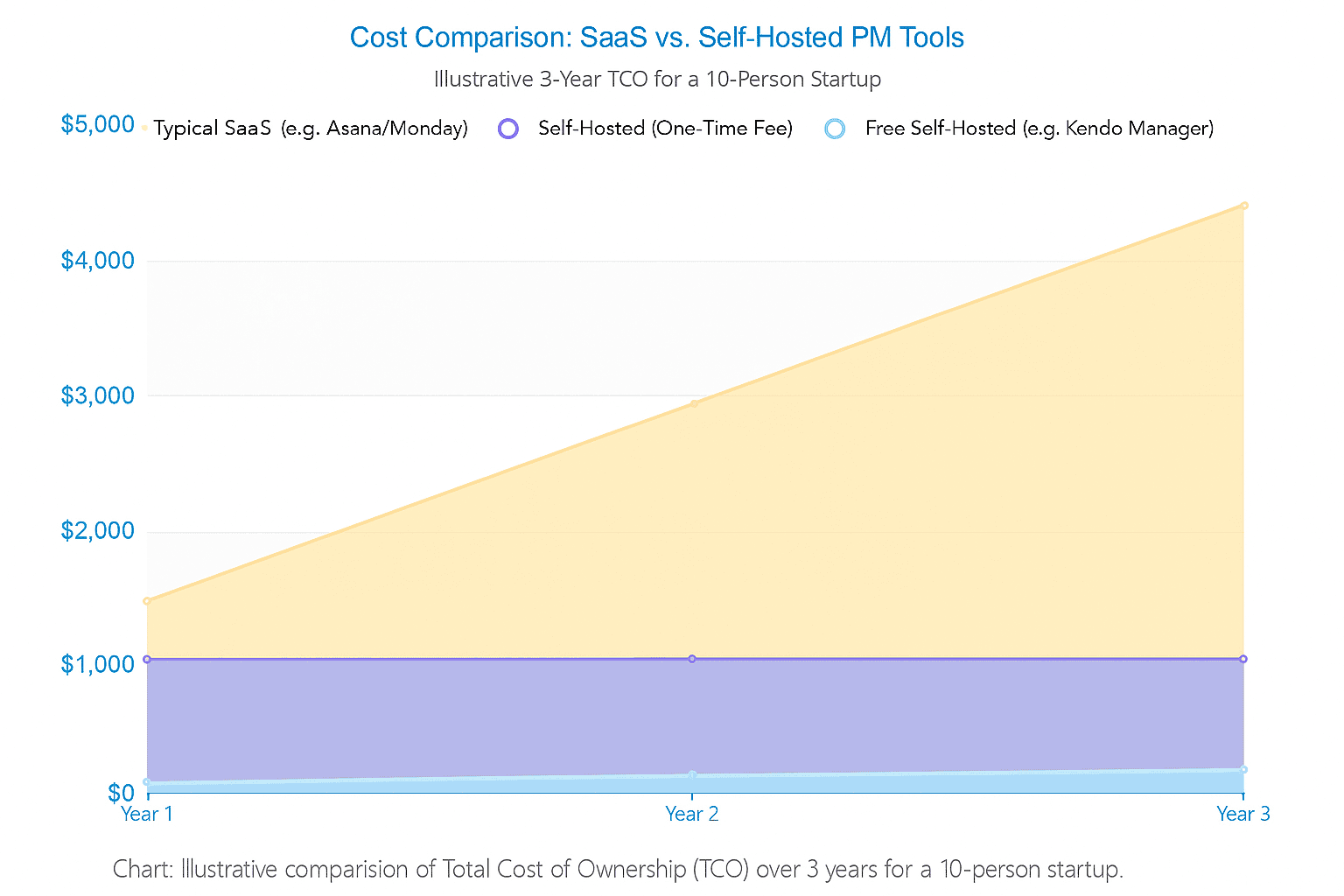
- Cost-Effectiveness & Predictable Budgeting: The SaaS pricing model is designed to scale with your team size, meaning your costs escalate as you grow. This penalizes success. A free, open-source tool eliminates this monthly drain entirely. Even for commercial self-hosted software, the model is often a one-time license fee. This dramatically lowers the Total Cost of Ownership (TCO) over the long term. For a startup where every dollar counts, predictable, low-cost infrastructure is a massive advantage, freeing up capital for development, marketing, and hiring.
- Unmatched Customization & Control: SaaS tools offer a one-size-fits-all experience. You are bound by their feature set, their update schedule, and their integration capabilities. With a self-hosted platform, you gain the freedom to tailor the software to your unique workflow. You can integrate it with other internal systems, modify open-source code to add specific features, and decide when—or if—to apply updates. This prevents vendor lock-in, ensuring that your operational backbone is not dependent on the whims of another company’s product roadmap or potential acquisition.
- Superior Performance & Reliability: While cloud providers offer robust infrastructure, your performance can be affected by shared resources and network latency. By hosting the software on your local network, you can achieve faster response times and ensure the system is always available, even during internet outages. You are in control of the hardware, allowing you to scale resources directly as your team’s needs grow, ensuring a consistently smooth and reliable user experience.
Top Free Self-Hosted Project Management Tools for Startups in 2026
The market for on-premise project management software is diverse, ranging from powerful commercial systems to flexible open-source frameworks. We have evaluated the leading options for 2026 based on criteria crucial for startups: feature richness of the free offering, ease of setup and maintenance, community support, and overall suitability for a dynamic, resource-constrained environment.
Kendo Manager: The All-in-One Enterprise Solution, Free for Startups
Overview: Kendo Manager stands out in the self-hosted landscape by offering a professional-grade, comprehensive project management suite that is typically found in enterprise environments. Its most compelling feature for new businesses is its unique licensing model: a powerful, full-featured free version for startups. This isn’t a stripped-down trial version; it’s the complete enterprise platform, designed to give small teams the tools they need to establish robust processes from the very beginning without any financial investment.
Built on a stable Microsoft .NET and MariaDB foundation, Kendo Manager provides a secure and reliable environment that can be deployed on a company’s existing infrastructure, including a standard Windows 10 PC, making it exceptionally accessible.
Core Features:
- Hybrid Project Management: Kendo Manager seamlessly integrates different methodologies. Teams can leverage an interactive Gantt chart for traditional waterfall planning and dependency tracking, while simultaneously using customizable Kanban boards for agile workflows. This flexibility is ideal for startups where processes are still evolving.
- Complete Toolset for Full Project Lifecycle: The platform covers every aspect of project management. This includes detailed task and subtask management, time tracking, cost and budget management, and robust resource management to prevent team burnout and optimize workload distribution.
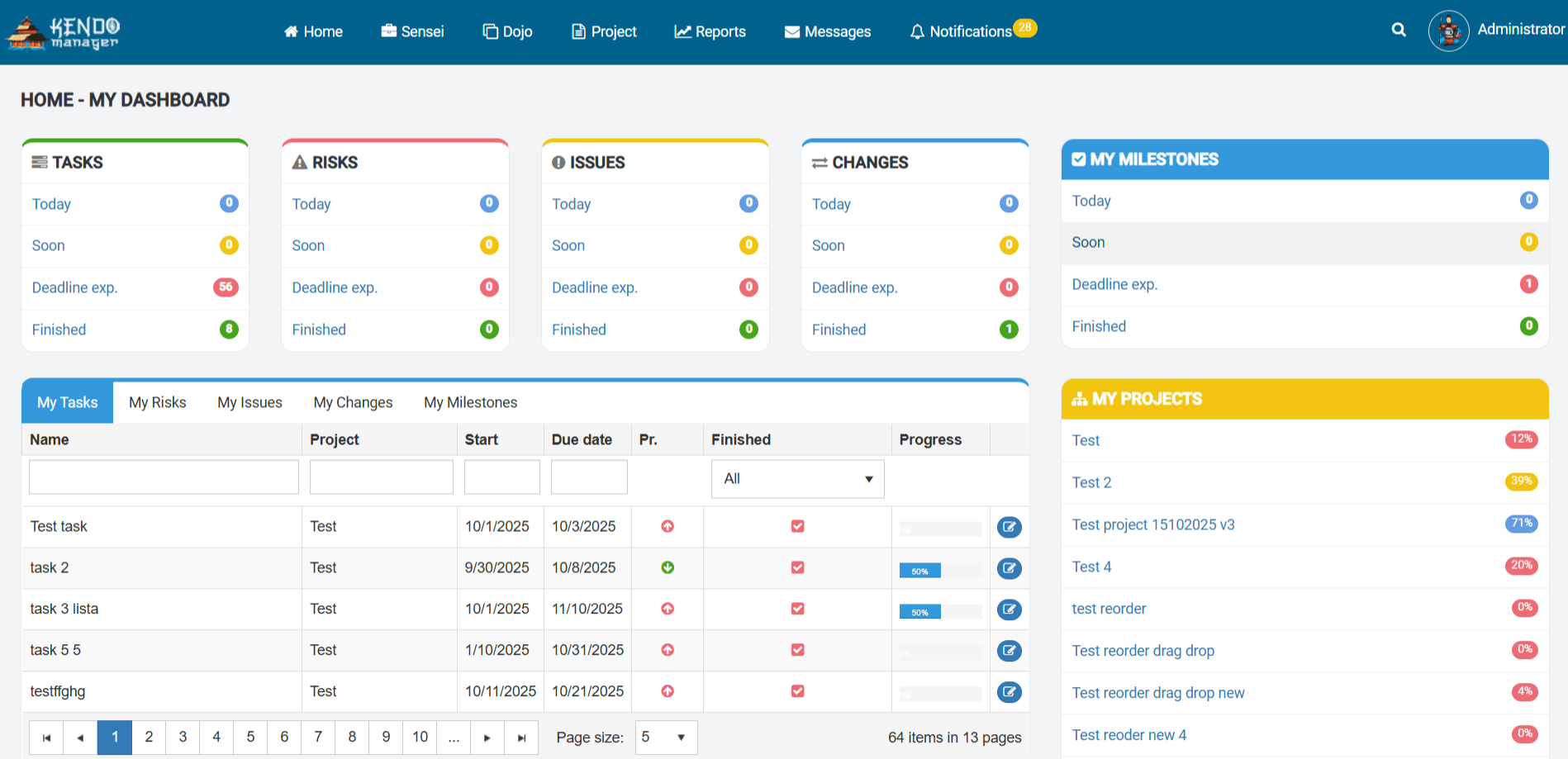
- Real-time Dashboards & Reporting: Kendo Manager provides powerful visualization tools like the “Dojo” portfolio dashboard and personal dashboards. These offer high-level views for stakeholders and granular, real-time process insights for project managers, ensuring everyone is aligned and informed.
- Integrated Collaboration: Features like document sharing, task-level comments, and clear role definitions foster effective communication, whether the team is in the same office or working remotely.
Why It’s Perfect for Startups:
- No Feature Limitations in the Free Tier: This is Kendo Manager’s killer feature. The free version (for 1 active project and up to 10 team members) provides access to the entire enterprise feature set. Startups don’t have to compromise on functionality, allowing them to manage complex projects with the same tools as a large corporation, completely free of charge.
- Predictable, Budget-Friendly Growth Path: When a startup outgrows the generous free tier, the upgrade path is a simple, one-time license fee. This predictable, non-recurring cost is a stark contrast to the ever-increasing monthly fees of SaaS competitors, making financial planning straightforward and sustainable.
- Low Barrier to Entry: The ability to install Kendo Manager on an existing Windows server or even a standard office PC significantly lowers the technical barrier. Startups don’t need to invest in specialized Linux administrators or complex cloud infrastructure to get started with a powerful, secure, self-hosted solution.
Best For: Startups that need a powerful, professional, and all-in-one solution from day one. It’s the ideal choice for founders who want to avoid the technical overhead of configuring open-source tools and plugins, and who value a clear, affordable path to scaling their operations.
OpenProject: The Open-Source Powerhouse for Security-Conscious Teams
Overview: OpenProject is a leading open-source alternative to tools like Jira, with a strong emphasis on data security, privacy, and compliance. Developed in Germany, it adheres to high data protection standards, making it a trusted choice for security-sensitive organizations. Its commitment to the “Public Money, Public Code” principle ensures continuous development of its free and feature-rich Community edition.
Core Features:
The free Community edition of OpenProject is remarkably comprehensive. It supports classic project management with detailed Gantt charts, agile methodologies with Kanban and Scrum boards, and hybrid approaches. Core functionalities include work package tracking, time and cost reporting, project wikis for knowledge management, and meeting scheduling.
Pros:
- High Security Standards: With its European roots, OpenProject is built with GDPR and data sovereignty in mind, giving startups peace of mind.
- Robust Free Version: The Community edition includes the vast majority of features needed for professional project management, without user or project limits.
- Active Community & Development: As a prominent Open Source Initiative-aligned project, it benefits from a large community and regular updates.
Cons:
- Resource Intensive: Hosting OpenProject effectively requires a reasonably powerful server, which might be an overhead for very early-stage startups.
- Enterprise Feature Gate: Some advanced features, such as premium security settings (e.g., two-factor authentication), custom branding, and professional support, are reserved for the paid Enterprise editions.
Best For: Tech startups, engineering teams, and any organization with strict data compliance requirements. It’s perfect for those who value the transparency and customizability of open source and have the technical resources to manage a more demanding hosting environment.
Redmine: The Highly Customizable & Extensible Framework
Overview: Redmine is one of the most established names in the open-source project management world. Written on the Ruby on Rails framework, it’s less of a polished, out-of-the-box solution and more of a highly flexible and lightweight foundation. Its core strength lies not just in its native features, but in its vast ecosystem of community-developed plugins that allow you to build a completely bespoke system.
Core Features:
The core of Redmine provides robust issue tracking with custom fields, multi-project support, Gantt charts, calendars, news feeds, document management, and project wikis. However, its true power is unlocked through plugins, which can add features like agile boards, advanced CRM, helpdesk functionality, and detailed reporting.
Pros:
- Extremely Lightweight: Redmine is known for its minimal resource consumption, allowing it to run smoothly on very modest hardware.
- Infinitely Customizable: With thousands of free and paid plugins available, you can tailor Redmine to almost any conceivable workflow.
- Mature and Stable: Having been around for many years, Redmine has a large, knowledgeable community and a stable, well-tested codebase.
Cons:
- Dated User Interface: The default Redmine interface can feel clunky and outdated compared to modern alternatives.
- High Technical Barrier: Installation, configuration, and especially the management of multiple plugins require significant technical expertise, often with Ruby on Rails.
- Fragmented Experience: Relying on third-party plugins can lead to an inconsistent user experience and potential maintenance headaches when updating the core application.
Best For: Technically proficient startups, particularly those with in-house Ruby on Rails development skills. It’s the ideal choice for teams that require a completely custom-built system and are willing to invest the time and effort into its configuration and maintenance.
Taiga: The Agile-First Tool with a Beautiful UI
Overview: Taiga is an open-source project management tool designed from the ground up for agile teams. It places a strong emphasis on user experience, offering a beautiful, intuitive, and clutter-free interface that makes agile practices like Scrum and Kanban a pleasure to implement.
Core Features:
Taiga excels at its core purpose. It features highly functional and visually appealing Kanban boards with Work-in-Progress (WIP) limits. For Scrum teams, it offers a comprehensive suite of tools including a product backlog, sprint planning, burndown charts, and an estimation tool. Each project also comes with an integrated wiki for documentation and issue tracking for bugs or impediments.
Pros:
- Excellent User Experience: Taiga’s UI is modern, clean, and highly intuitive, reducing the learning curve for new team members.
- Deeply Focused on Agile: It provides all the necessary tools to properly implement Scrum and Kanban methodologies according to the Agile Manifesto principles.
- Good for Cross-Functional Teams: Its design is appreciated by developers, designers, and project managers alike, fostering better collaboration.
Cons:
- Limited for Non-Agile Workflows: Taiga is not well-suited for traditional or hybrid project management. It lacks a native Gantt chart, which can be a deal-breaker for projects requiring long-term timeline planning and dependency management.
- Complex Setup: While documentation has improved, the self-hosted installation, often involving Docker, can be challenging for users without a technical background.
Best For: Startups in software development, product design, or marketing that are fully committed to agile methodologies. It’s the perfect fit for teams that prioritize a modern, user-friendly interface and don’t require traditional project planning tools.
How to Choose the Right On-Premise PM Tool for Your Startup
Selecting the right software from this list requires a clear-eyed assessment of your startup’s unique needs, capabilities, and future goals. Here is a practical framework to guide your decision-making process.
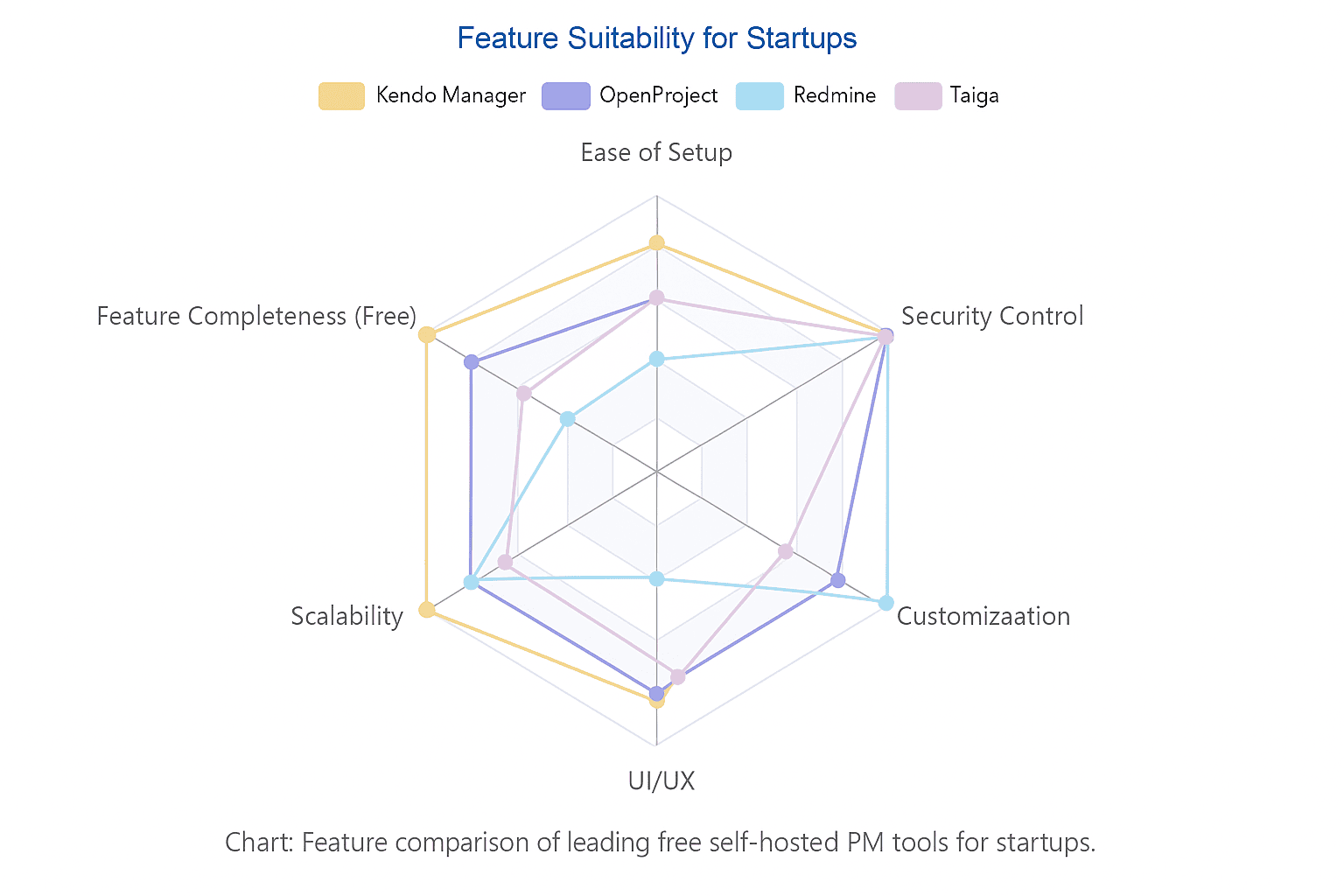
Factor 1: Assess Your Technical Resources
Be brutally honest about your team’s technical capabilities. A powerful tool is useless if you can’t get it running or keep it maintained.
- Low-Tech Team: If your team lacks a dedicated IT person or DevOps expertise, prioritize solutions with straightforward installation processes. Kendo Manager, with its simple setup on Windows, is a strong contender.
- Tech-Savvy Team: If your team is comfortable with the command line, databases, and containerization technologies like Docker, then options like OpenProject or Taiga become viable. For teams with deep development skills, especially in Ruby, the high customizability of Redmine might be the most powerful choice.
Factor 2: Define Your Core Workflow
How does your team actually work? Your project management tool should support your process, not force you into a new one.
- Agile-First: If your entire workflow revolves around sprints, backlogs, and Kanban boards, Taiga is purpose-built for you. Its design philosophy is centered on agile principles.
- Hybrid or Traditional: If you need to manage long-term roadmaps, track dependencies between tasks, and provide stakeholders with clear timelines, a Gantt chart is non-negotiable. In this case, Kendo Manager and OpenProject are superior choices, as they are designed for hybrid environments that accommodate both agile and traditional planning.
Factor 3: Consider Future Scalability and Cost
Think about where your startup will be in 12-24 months. Your chosen tool should support that growth without introducing unexpected costs or migration headaches.
- Free Tier Sufficiency: Will the free version’s limitations (if any) become a bottleneck? Kendo Manager’s free tier is limited by project/user count, while OpenProject’s is limited by advanced features. Assess which limit you’re more likely to hit first.
- Upgrade Path: What happens when you need to scale? Kendo Manager offers a clear, predictable one-time license fee. OpenProject moves to a per-user subscription model. Redmine and Taiga might require purchasing paid plugins or support contracts. For a startup, the predictability of a one-time cost can be a significant advantage for financial planning.
Quick-Check Decision Table
| Feature / Factor | Kendo Manager | OpenProject | Redmine | Taiga |
|---|---|---|---|---|
| Best For | All-in-one, professional needs | Security & open-source purists | High customization | Agile-first, UX focused |
| Free Version | Full Enterprise Suite (1 proj / 10 users) | Community Edition (most features) | Fully free (core) | Fully free (core) |
| Setup Difficulty | Low–Medium | Medium–High | High | Medium–High |
| Primary Methodology | Hybrid (Agile & Traditional) | Hybrid (Agile & Traditional) | Flexible (via plugins) | Agile (Scrum & Kanban) |
| Gantt Chart | ✅ Yes (Advanced) | ✅ Yes | ✅ Yes (Basic) | ❌ No |
| Upgrade Path | One-time license fee | Subscription | Paid plugins | Paid support |
Frequently Asked Questions (FAQ) about Free Startup Project Management Software
- Is free self-hosted project management software really free?
- Yes, the software license itself is often free, especially with open-source options like OpenProject or Taiga. Tools like Kendo Manager offer a perpetually free plan for startups. However, you are responsible for the “hosting” costs, which means the server (which can be a simple office PC) and any time spent on maintenance. This is still significantly cheaper than paying per-user, per-month subscription fees.
- How much technical skill is needed to set up on-premise software?
- It varies. Solutions like Kendo Manager are designed for easier installation on Windows environments. Tools like Redmine or Taiga often require familiarity with command lines, databases, and Docker. Always check the installation guide before committing.
- Can I migrate to a paid plan or a different server later?
- Absolutely. That’s a key benefit of self-hosting. With a self-hosted solution, you own your data. Most tools provide clear upgrade paths (like Kendo Manager’s license unlock) or export functionalities that make migration possible. You are never locked into a vendor’s ecosystem.
- What’s the difference between “self-hosted” and “open source”?
- “Self-hosted” means you run the software on your own servers. “Open source” means the source code is publicly available for anyone to view, modify, and distribute, as defined by the Open Source Initiative. While many self-hosted tools are open source (like OpenProject, Redmine), some are commercial products that offer a self-hosted deployment option (like Kendo Manager).
Free self-hosted platform
For startups navigating the competitive landscape of 2026, the choice of a project management tool is more than an operational detail—it’s a strategic decision that impacts budget, security, and scalability. A free self-hosted platform offers a powerful solution to conserve cash, secure vital intellectual property, and build processes that can grow with the company. While pure open-source options like OpenProject, Redmine, and Taiga provide immense flexibility, they often demand a trade-off in terms of setup complexity, maintenance overhead, and feature completeness out of the box.
Kendo Manager carves out a unique and compelling position in this space. It effectively bridges the gap between the raw power of open-source and the polished experience of commercial enterprise software. By offering its complete, professional-grade platform for free to startups, Kendo Manager removes the typical compromises, providing a solution that is both powerful and accessible from day one.
Ready to bring order to your startup’s workflow without breaking the bank?
Download the Free Version of Kendo Manager Today
Experience the power of a professional project management tool with zero subscription fees.

