
Kendo: On-Premise Project Management Software
Kendo Manager is the simple and intuitive On-premise project management software. Kendo represents a powerful combination of Microsoft and Open source technology. It is a perfect option for small, medium and large companies that want to have complete control over data security and privacy.
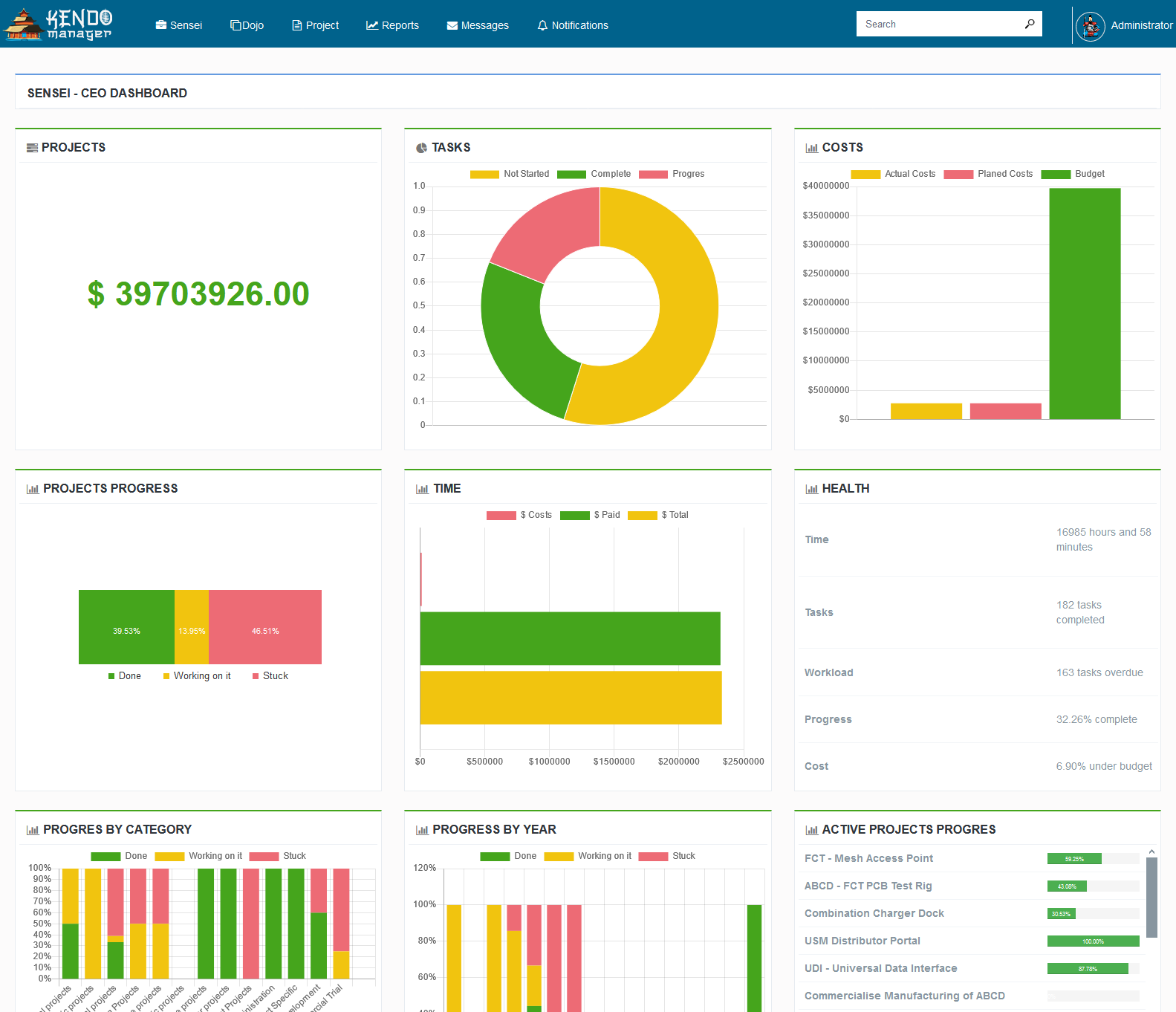
What Is On-Premises Software
On-premises software is installed and runs on computers on the premises of the person or company using the software, rather than at such as cloud. Customer buys or rents server-based software as a licensee, which is installed on their own servers or rented servers.
On-premises software is considered more secure, as the entire instance of the software remains on the companies premises.
Today, Many companies opt for on-premise project management software because it doesn’t require third-party access, gives owners physical control over the server hardware and software, and does not require them to pay month after month for access.
On-Premises Project Management Software advantages
On-premise Project Management software like Kendo has many advantages. On-premises software provides a centralized project management for companies and PMO (Project Management Office) while offering controlled access for different users.
Our Project Management software is based on traditional and Agile project management methodology. We follows the PMBOK guidelines and recommended of Project Management Institute.

Kendo is a flexible On-premise software solution for managing projects of any type. Whether you are working in construction, services, consulting, engineering, business or software development, Kendo will help you complete your projects on schedule, on time and on budget.
Kendo on-premise project management software comes without any additional software investment/setup cost for company or PMO. You can install it on any Windows Server, Windows VPS, Windows 10 PC or ASP hosting.
On-premise Project Management Features
Kendo Manager has many options such as:
- Real time dashboards (Dojo, Project dashboards, My dashboards),
- Task management,
- Resource management,
- Gantt chart,
- Kanban board,
- Costs management,
- Time management,
- Issue tracking,
- Change Management
- Risk management,
- Reports ..
Kendo On-premise project management software is designed to help companies to successfully completed own project plans, allocate resources and analyze workload.
Also, our On- premise software is an ideal solution for project management office (PMO) and their Project Portfolio Management, Resource Management and Team Collaboration.
Who is using on-premises software?
According to Management Study Guide, “Project Management is the art of managing all the aspects of a project from inception to closure using a scientific and structured methodology.
Successful companies, organizations and PMOs use appropriate project management software to support their daily work. Kendo Manager is On-premise project management software that provides easy resource management, real-time scenario planning, and portfolio comparison so PMO-s can manage and plan portfolios.
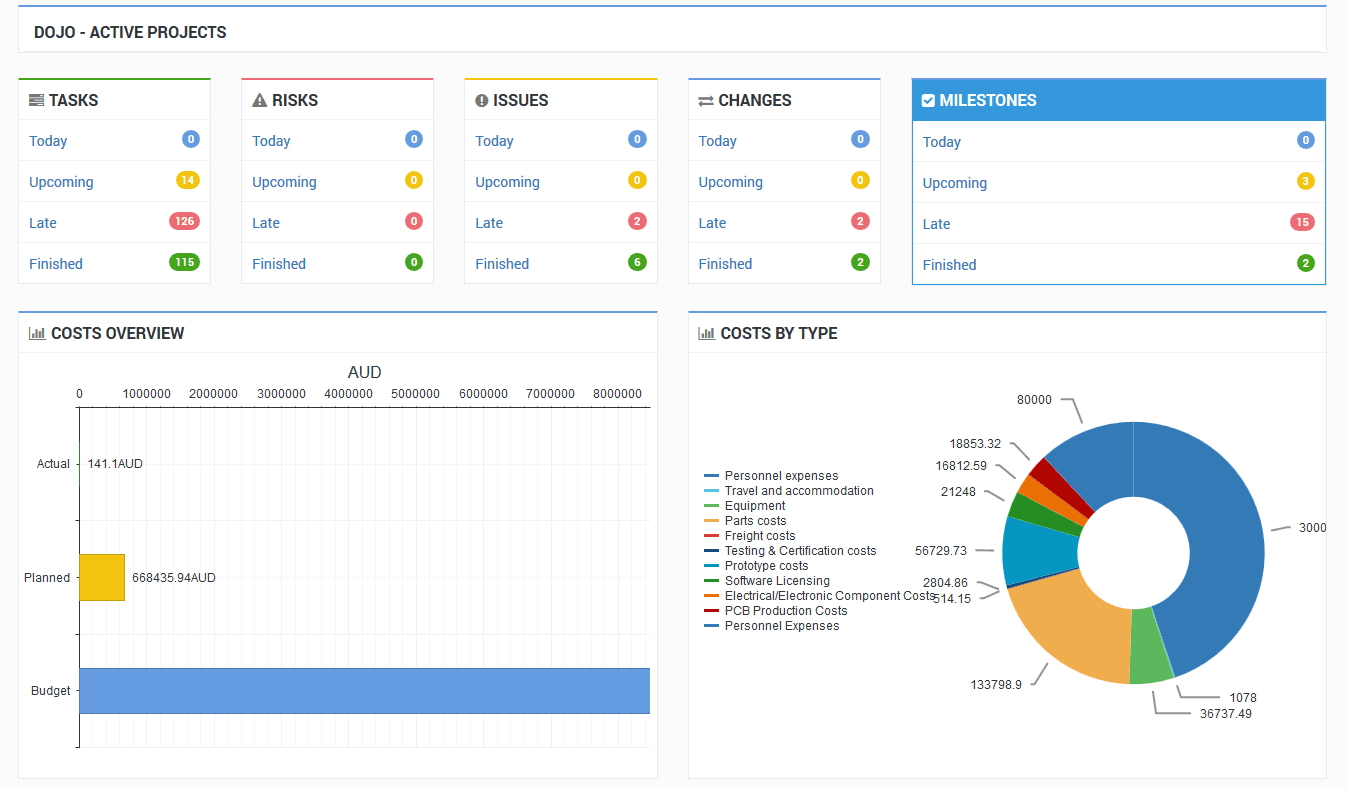
Our On-premise software has Dojo dashboards that give you instant bird’s eye views into the health and progress of all your active projects. You can:
- Monitor plan progress
- Track costs
- Track time
- Track Risks
- Track Issues and changes
- View resource availability
- View all active tasks
- Keeping your plans on track has never been easier.
To see why PMOs love Kendo Manager, start a free 30 day trial or download a Free version.
What Is PMO Software
PMO software is a term for the tools and features within project management solutions that enable your project management office to accomplish all the processes effectively.
PMO Software provide support to management, help to keep projects on track and make sure every action is compliant with regulatory rules and standards. When you have the right PMO software, it’s easy to avoid operational risks, budget effectively and monitor productivity.
Kendo Manager is the best on-premise project management software for your Project management office with all option that you needed for successful operation.
What’s better: On-premise or Cloud Project Management Software?
The simple answer is: it depends.
Every job is different, and the right solution depends on what your problems are. Is your budget the most important consideration? Security? Or maybe, simple communication and collaboration? Each company has different priorities and needs.

Advantages of On-premise Project Management Software
Our flexible project management software allows you to maximize your project and portfolio management investment. Whether you are looking for a Self-Hosted or an On-Premise project management, Kendo Manager Project Server provides multiple delivery options in line with your infrastructure with a low barrier of entry.
- Access anytime, anywhere – Running the application only requires access to readily available web browser software such as Firefox, Chrome or Internet Explorer.
- One time investment – You pay for the application licenses once and a low annual maintenance fee for support and upgrades (this is optional)
- Shareable – Data can be shared with staff and other business partners. However, you control who has access to what.
- Secure – The applications are hosted on-site behind your firewall and are aligned with your company backup and security policies.
- Data accessibility – Since the data resides within the four walls of your company there are no barriers of access to extract data from the system.
Check our project Management tutorials – This Training Videos will help you understand what is Kendo Manager Project Server.
Free On-premise project management software for companies
And that’s not all, if you have started a startup company, and you are looking for on-premise project management software to install on your private server for free. We have a solution for you – Free Kendo project management software. Kendo Manager offers a FREE Project Management Software version for 1 active project and 2 active team members. Later, when your company has a larger team and more projects you can easily Contact Us and buy a license and unlock Kendo Manager for multiple projects and team members.
Check our reviews on Capterra!
Frequently Asked Questions
Do you help in installation and upgrades?
Our support team will assist you if you have any questions during the installation and upgrade. We provide free remote Kendo installation for our clients.
What kind of expertise is required to install and manage Kendo On-Premise?
Kendo Manager installation is simple. Your administrator or employee needs to follow the installation instructions, which consist of a few simple steps. More info: https://www.kendomanager.com/kendo-manager-installation-guide-for-windows/
Which technology is Kendo software developed in?
Kendo Manager has been developed using Microsoft technology ( Asp.Net), and uses MariaDB free open source database. The product is 100% web-based and all a user needs is a modern browser (Chrome, Firefox, Edge, Opera , Safari)
Whether Kendo Manager can be installed on the company’s existing infrastructure
Yes of course. You can install Kendo Manager On-premise Project Management Software within your existing company infrastructure (Company Windows VPS, Office PC with Windows 10, Company Windows Server, 2012, 2016, 2019 or Asp Net Hosting.) Or online. More info: https://www.kendomanager.com/kendo-manager-installation-guide-for-windows/
Is it possible to install Kendo manager online?
Yes of course. Kendo Manager can be installed on online Windows Server, Windows VPS or ASP hosting.
More info: https://www.kendomanager.com/kendo-manager-installation-guide-for-windows/

