
The best Gantt chart software for a team is one where everyone sees the same live timeline in a browser, rather than passing a file between desktops. Kendo Manager is Gantt chart software you host on your own Windows machine — a server, a workstation, a VPS, or an Azure VM — where the whole team plans tasks, dependencies, and resources through a browser, on a shared plan that updates for everyone at once.
That shared, browser-based model is the main difference from free desktop Gantt tools, which install on one computer and keep the plan in a local file. This guide explains what Gantt chart software does, what separates a network tool from a desktop one, the features that matter, and how Kendo Manager compares — including a free tier for up to 10 users.

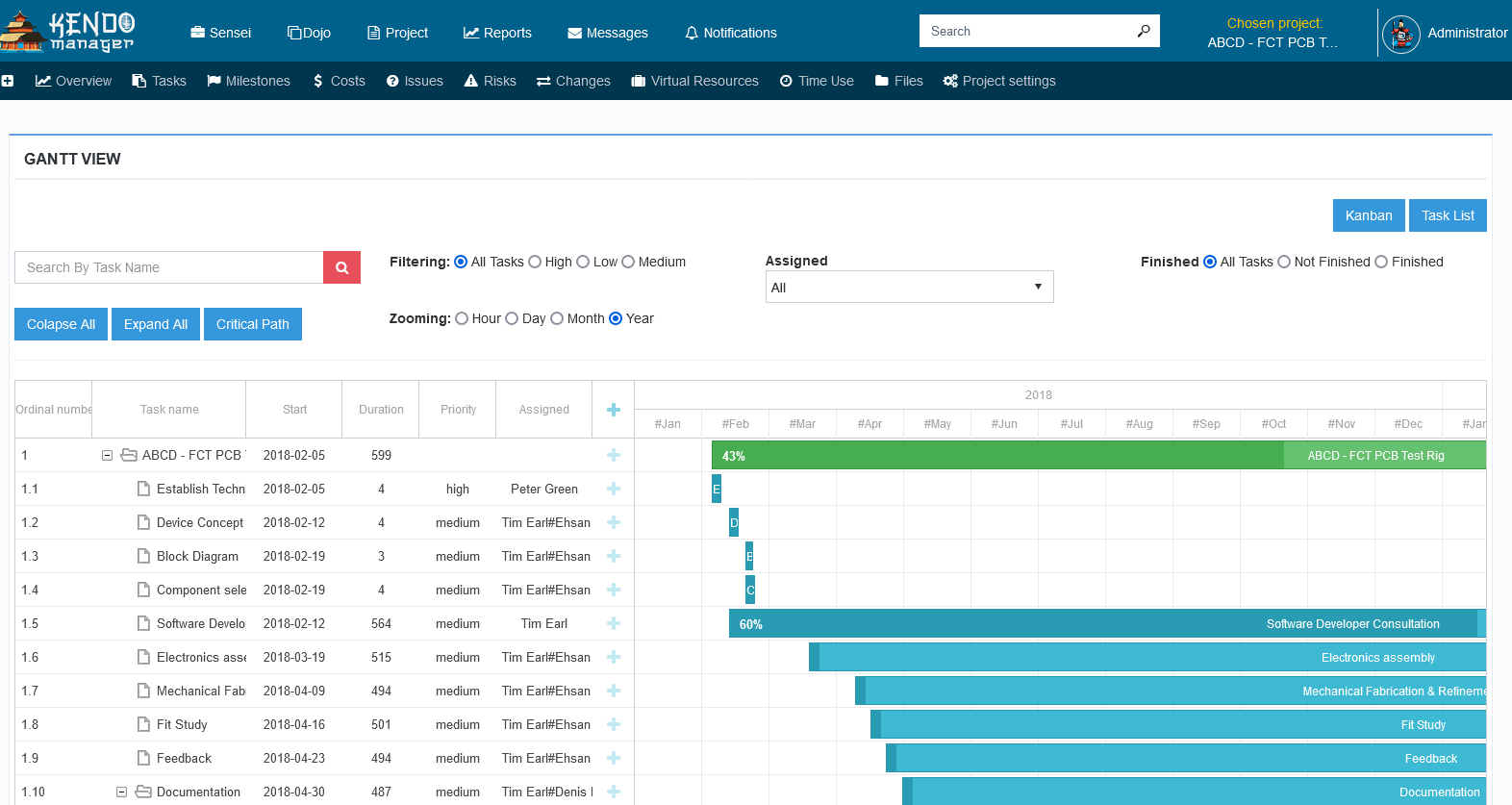
What is Gantt chart software?
Gantt chart software is a planning tool that shows a project as a horizontal timeline, where each task is a bar whose length is its duration and whose position is its schedule, with lines linking tasks that depend on each other. It turns a task list into a visual plan, so a delay on one task visibly shifts everything that depends on it, and a team can see the whole project’s shape at a glance rather than reading down a spreadsheet.
What is the difference between desktop and network Gantt software?
Desktop Gantt software installs on a single computer and stores the plan in a local file, while network Gantt software runs on a server and lets the whole team open the same live plan in a browser. The distinction decides whether a Gantt chart is a personal document or a shared source of truth — with a desktop file, only one person edits at a time and updates travel by email; with a network tool, everyone works on one plan that updates for all of them.
| Desktop Gantt tool | Network Gantt (Kendo) | |
|---|---|---|
| Where the plan lives | Local file on one PC | On your server, shared |
| Who can edit | One person at a time | The whole team, live |
| Access | That one computer | Any device with a browser |
| Updates | Emailed back and forth | Instant for everyone |
What features should Gantt chart software have?
Good Gantt chart software has to do more than draw bars — it needs task dependencies, resource assignment, milestones, and progress tracking to be a working plan rather than a static picture. These are the features that let the chart recalculate when reality changes, instead of becoming another document that goes stale.
| Feature | What it does |
|---|---|
| Task dependencies | Links tasks so a delay cascades through the plan |
| Resource assignment | Shows who is doing what and who is overloaded |
| Milestones | Marks key checkpoints on the timeline |
| Progress tracking | Compares planned schedule against actual work |
| Kanban / task views | Switches between timeline and board as needed |
Does Kendo Manager’s Gantt work in the browser and over a network?
Yes — Kendo Manager’s Gantt chart runs as a web application on your own Windows machine, so the team reaches the same live chart through a browser on the local network or over the internet, with no desktop client to install per person. The plan lives on the server; each person opens a URL. On a local network that means everyone in the office edits one shared chart; hosted on a VPS or Azure VM with an address and SSL, the same chart is reachable from anywhere.
The hosting options are covered on our self-hosted project management and on-premise project management software pages.
Does Kendo Manager’s Gantt come with a free tier?
Yes — Kendo Manager’s Gantt chart is included in its free tier, covering 1 active project and 10 team members, hosted on your own machine so the plan is shared over the network rather than locked to one desktop. That keeps the chart on hardware you control while still being editable by the whole team.
For a full comparison of no-cost options, see our free Gantt chart software page, or the current Kendo Manager prices.
How does Kendo Manager compare with a desktop Gantt tool?
Kendo Manager and a free desktop Gantt tool both draw a proper Gantt chart, but they differ on collaboration and access: a desktop tool is a single-user file on one computer, while Kendo Manager is a shared plan on a server that the team edits together in a browser. For one planner working alone, a desktop tool is enough; for a team that needs one live plan, a network tool removes the file-passing entirely.
| Kendo Manager | Free desktop Gantt tool | |
|---|---|---|
| Model | Web-based, on your server | Desktop, single machine |
| Team use | Shared live plan | One user, local file |
| Access | Any browser, any device | Installed computer only |
| Free tier | 10 users, 1 project | Usually single-user |
| Install | One-click on Windows, ~5 min | Per-machine install |
How do you set up Gantt chart software on Windows?
You set up Kendo Manager’s Gantt software by running its one-click installer on a Windows machine, which takes about five minutes and needs no Docker, Linux, or database administrator. It runs on IIS and the free MariaDB database — both hosted on Windows 10, 11, or Server — and once installed, the team opens the Gantt chart in a browser. For remote access, the same install on a Windows VPS or Azure VM is reachable anywhere with an address and SSL.
Step-by-step setup is in the Kendo Manager installation guide for Windows.
Frequently asked questions
What is the best Gantt chart software for a team?
For a team, the best Gantt chart software is a network tool where everyone edits one shared plan in a browser, rather than a desktop file passed between people. Kendo Manager runs this way on your own Windows server, with a free tier for up to 10 users.
Is there Gantt chart software that runs on my own server?
Yes — Kendo Manager is Gantt software you host on your own Windows server, workstation, VPS, or Azure VM, keeping the project data inside your control. The team reaches the Gantt chart through a browser rather than installing a desktop client.
Can several people edit the same Gantt chart at once?
Yes — because Kendo Manager stores the plan on a server rather than in a local file, the whole team works on one shared Gantt chart that updates live for everyone. This is the main advantage over single-user desktop Gantt tools.
Is there free Gantt chart software for teams?
Kendo Manager’s free tier includes its Gantt chart for up to 10 team members and 1 active project, hosted on your own machine so the plan is shared across the team. Most free Gantt tools are single-user desktop apps by comparison.
Does Gantt software need to be installed on every computer?
No — because Kendo Manager is web-based, it is installed once on a server and reached through a browser, so there is no per-computer install. Desktop Gantt tools, by contrast, must be installed on each machine that uses them.