
What Is the Best Free Gantt Chart Software You Can Self-Host in 2026?
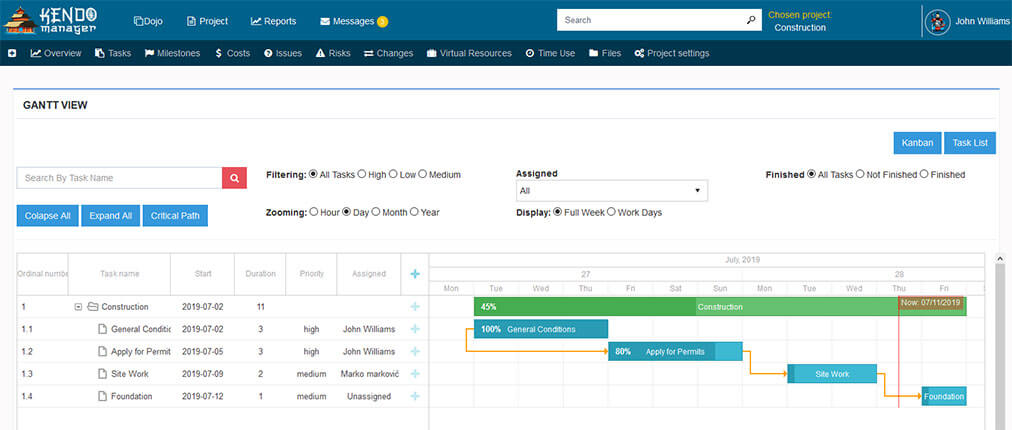
The best free Gantt chart software for a team that wants to avoid subscriptions is one you self-host on your own Windows machine, so the full feature set is free within its limits and the data stays on hardware you control. Kendo Manager offers this: a free tier that includes the complete Gantt chart — dependencies, resources, and milestones — for 1 active project and 10 team members, installed on Windows in about five minutes.
Most tools advertised as “free Gantt chart software” are either single-user desktop apps or capped cloud tiers that keep your plan on a vendor’s servers. A self-hosted free tier is different: the software is genuinely free within its limits, the plan lives on your own machine, and the whole team edits it in a browser. This guide explains the types of free Gantt tools, what the Kendo Manager free tier includes, and how self-hosted free compares with a free cloud plan.
What are the types of free Gantt chart software?
Free Gantt chart software comes in three types, and they are not equally free once a team needs to share the plan: single-user desktop apps, capped cloud tiers, and self-hosted free tiers. The difference decides whether the chart is a personal file, a vendor-hosted plan with limits, or a shared plan on your own server.
| Type | Where the plan lives | The catch |
|---|---|---|
| Desktop app | Local file on one PC | Single user, no live sharing |
| Free cloud tier | Vendor’s servers | Capped features, your data hosted elsewhere |
| Self-hosted free tier | Your own server | Capped users/projects, you host it |
Kendo Manager is the third type, with the difference that it installs on Windows without Docker or Linux — so hosting it yourself is a five-minute install, not a technical project.
What does the free Gantt chart tier include?
The Kendo Manager free Gantt tier is permanently free under a perpetual licence and includes the full Gantt chart — task dependencies, resource assignment, milestones, and progress tracking — for 1 active project and 10 team members. It is the complete charting tool within those limits, not a stripped-down preview, and the same install switches between Gantt, task list, and Kanban views.
| Free Gantt tier | Included |
|---|---|
| Active projects | 1 active project |
| Team members | Up to 10 |
| Gantt features | Dependencies, resources, milestones, progress |
| Other views | Task list and Kanban in the same install |
| Access | Browser-based, shared over the network |
| Licence | Perpetual, zero cost |
How does self-hosted free Gantt compare with a free cloud plan?
A self-hosted free Gantt tier and a free cloud plan are both zero-cost, but they differ on where the plan lives and what happens at the limits. A free cloud plan keeps your chart on the vendor’s servers and is built to nudge you toward a paid subscription; a self-hosted free tier keeps the chart on your own machine and, in Kendo Manager’s case, upgrades with a one-click move that keeps every project file.
| Self-hosted free (Kendo) | Free cloud plan | |
|---|---|---|
| Plan location | Your machine | Vendor servers |
| Cost at the limit | One-time licence upgrade | Monthly per-user fee |
| Gantt features when free | Full set included | Often gated behind paid tiers |
| Control | Full control of the install | Vendor controls the platform |
For the product-focused overview of the charting tool itself, see our Gantt chart software page.
What happens when you outgrow the free Gantt tier?
When you outgrow the free tier, moving to a paid version is a one-click upgrade that keeps every existing Gantt chart and project file — nothing is exported or rebuilt. A team that passes 10 users or needs a second active project unlocks a higher tier and continues in the same install, so starting free does not create a migration problem later.
Paid tiers run from Startup $749 to Professional $6,299 (unlimited users); see the current Kendo Manager prices.
How do you get free Gantt chart software running on Windows?
You get Kendo Manager’s free Gantt software running by installing it on a Windows machine with a one-click installer, which takes about five minutes and needs no Docker, Linux, or database administrator. It runs on IIS and the free MariaDB database on Windows 10, 11, or Server, and once installed the team opens the Gantt chart in a browser. Hosted on a Windows VPS or Azure VM, the same free install is reachable remotely.
Setup steps are in the Kendo Manager installation guide for Windows. For the wider category, see self-hosted project management.
Frequently asked questions
Is there genuinely free Gantt chart software?
Yes — Kendo Manager offers a permanently free Gantt tier under a perpetual licence, covering 1 active project and 10 team members with the full Gantt chart, self-hosted on your own Windows machine. It is free within those limits rather than a time-limited trial.
Does free Gantt chart software support dependencies and milestones?
Kendo Manager’s free tier includes task dependencies, resource assignment, and milestones, so the free Gantt chart recalculates when the schedule changes rather than being a static picture. Many free tools drop these behind paid plans.
Is free Gantt chart software online or desktop?
Both exist: desktop free tools store the chart in a local file on one PC, while Kendo Manager is web-based and self-hosted, so the team shares one live chart in a browser. A self-hosted tool can be reached online when hosted on a VPS or Azure VM.
Can a team share a free Gantt chart?
Yes — because Kendo Manager stores the plan on your own server, the whole team shares one live Gantt chart in a browser, up to 10 users on the free tier. Single-user desktop tools cannot do this without emailing files.
Will I lose my Gantt charts if I upgrade from free?
No — upgrading from the free tier to a paid version is a one-click move that keeps every Gantt chart and project file, and because the tool is self-hosted the data stays on your own machine throughout. There is no export or rebuild step.

