
The Ultimate Guide to Self-Hosted Project Management Software for Small Teams

Stop Juggling, Start Managing
Are you a small team drowning in a sea of spreadsheets, scattered email threads, and sticky notes? You’re not alone. The daily chaos of managing projects with inadequate tools is a common struggle, leading to missed deadlines, frustrated team members, and a constant feeling of being one step behind. While cloud-based project management tools promise a lifeline, they often come with ever-increasing subscription fees, limited customization, and nagging concerns about who truly owns your data. For agile startups and growing businesses where every dollar and every decision counts, there’s a smarter way to work. Self-hosted project management software for small teams such as Kendo Manager offers a powerful alternative, putting you back in the control of your tools, your data, and your budget.
- Introduction: Stop Juggling, Start Managing
- Why Self-Hosted Project Management is a Game-Changer for Small Teams
- Essential Features for Small Team Self-Hosted PM Software
- Top Self-Hosted Project Management Tools for Small Teams
- How to Implement Your Self-Hosted PM Tool: A Simple 4-Step Guide
- Conclusion: Take Control of Your Projects Today
- Frequently Asked Questions (FAQ)
Why Self-Hosted Project Management is a Game-Changer for Small Teams
While the “cloud-first” approach has dominated headlines, a growing number of savvy small teams are recognizing the distinct competitive advantages of hosting their own project management solutions. This isn’t a nostalgic return to old technology; it’s a deliberate, strategic move that addresses their most significant pain points head-on: budget constraints, data security risks, inflexible workflows, and the peril of vendor dependency. For a small business, these aren’t minor inconveniences—they are existential threats. Let’s dissect why taking control of your project management infrastructure is not just a preference, but a powerful strategic advantage.
Take Full Ownership of Your Data (Data Sovereignty & Security)
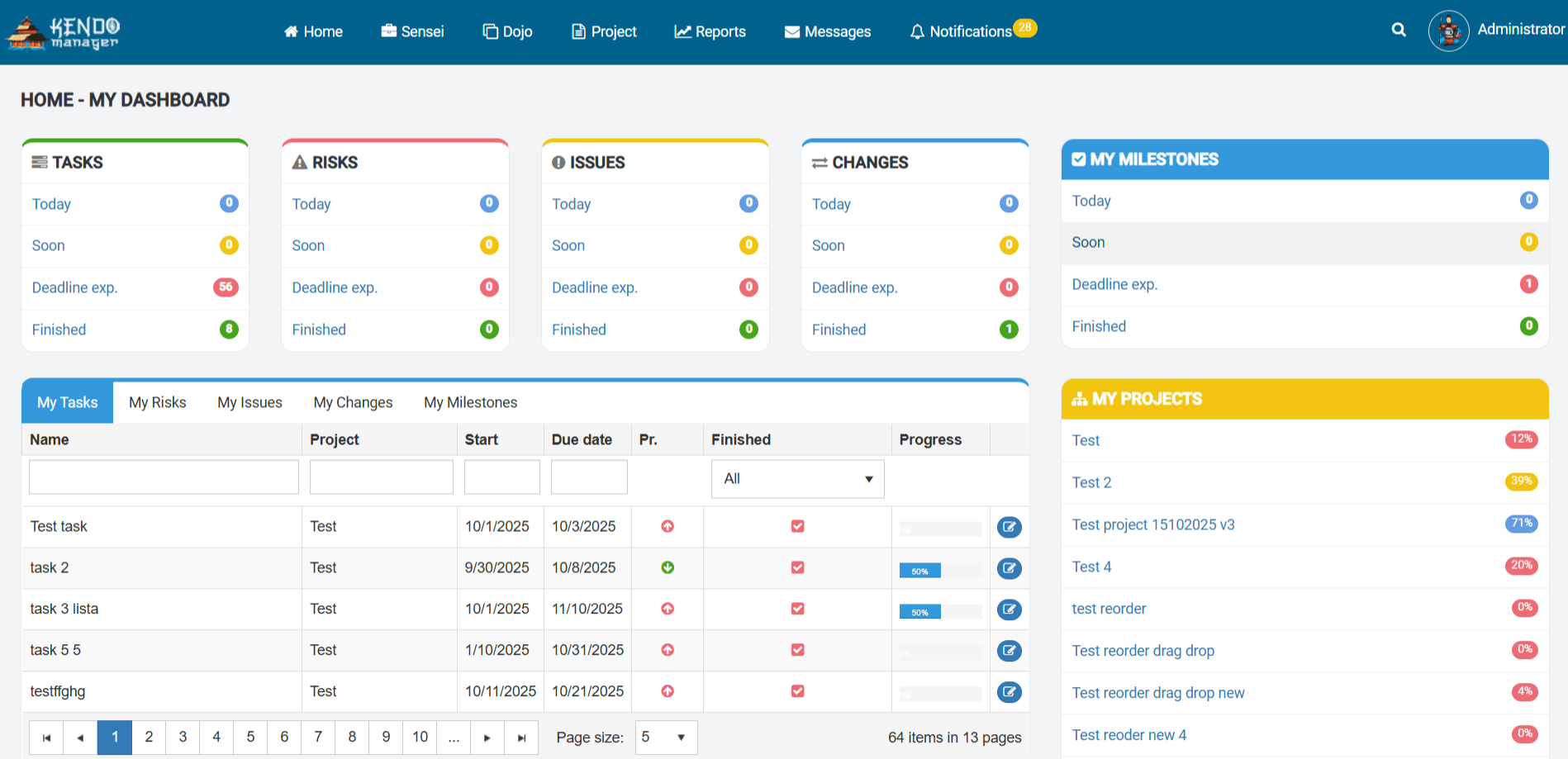
In an era defined by data breaches and stringent privacy regulations like GDPR and HIPAA, the question of “where does my data live?” has shifted from a technical detail to a critical business concern. When you use a cloud-based SaaS tool, the answer is simple but unsettling: it lives on someone else’s servers, governed by their security protocols and subject to their jurisdiction. Self-hosting fundamentally changes this dynamic, placing the keys to your digital kingdom firmly back in your hands.
Defining Data Sovereignty and Why It Matters
Data sovereignty is the principle that digital data is subject to the laws and legal jurisdiction of the country in which it is physically located. For a small team operating globally or in regulated industries, this is paramount. Storing sensitive client data on a US-based server when your clients are in the EU can create a complex web of legal and compliance challenges under GDPR. As noted by security experts, hosting your data yourself allows you to determine the physical location of your servers, ensuring you comply with regional regulations without ambiguity. OpenProject highlights that with a self-hosted solution, “there is no question around where the data is stored and which regulations to be complied with as you determine the terms and conditions.”
The Inherent Risks of Multi-Tenant Cloud Environments
Most public cloud services operate on a multi-tenant architecture, meaning your data is stored on the same physical servers as data from countless other companies. While providers implement logical separation, this model inherently carries risks. A security vulnerability exploited against one tenant could potentially impact others. Furthermore, you are entirely dependent on the vendor’s security team and their response protocols. As DreamFactory explains, self-hosting is crucial for organizations in highly regulated industries like healthcare and finance, which often hesitate to “take the leap into cloud computing” due to these privacy concerns. With a self-hosted system, your data is isolated within your own infrastructure, drastically reducing the attack surface and giving your IT team direct oversight in the event of a threat.
Use Case: The Small Med-Tech Startup
Imagine a small startup developing an application that manages patient health records. Under regulations like HIPAA in the United States, the protection of this data is not just a best practice; it’s a legal mandate with severe penalties for non-compliance. Using a generic cloud project management tool to track development tasks, user feedback, and bug reports containing even anonymized patient data could be a compliance nightmare. A self-hosted solution like Kendo Manager allows the startup to deploy the software on a HIPAA-compliant private server. They have full control over access logs, encryption protocols, and backup procedures, ensuring they can demonstrate due diligence to auditors and build trust with their healthcare clients. This level of control is simply not possible with a standard SaaS provider.
Escape the Subscription Trap (Cost-Effectiveness & TCO)
For small teams and startups, cash flow is king. Predictable, low operational costs are vital for survival and growth. The “per-user, per-month” pricing model of most SaaS project management tools seems affordable at first, but it’s a deceptive hook that penalizes growth. As your team expands from 3 to 5, then to 10 members, your monthly bill can quickly balloon from a trivial expense to a significant line item in your budget. Self-hosted software offers a refreshing escape from this recurring subscription trap.
Analyzing the Total Cost of Ownership (TCO)
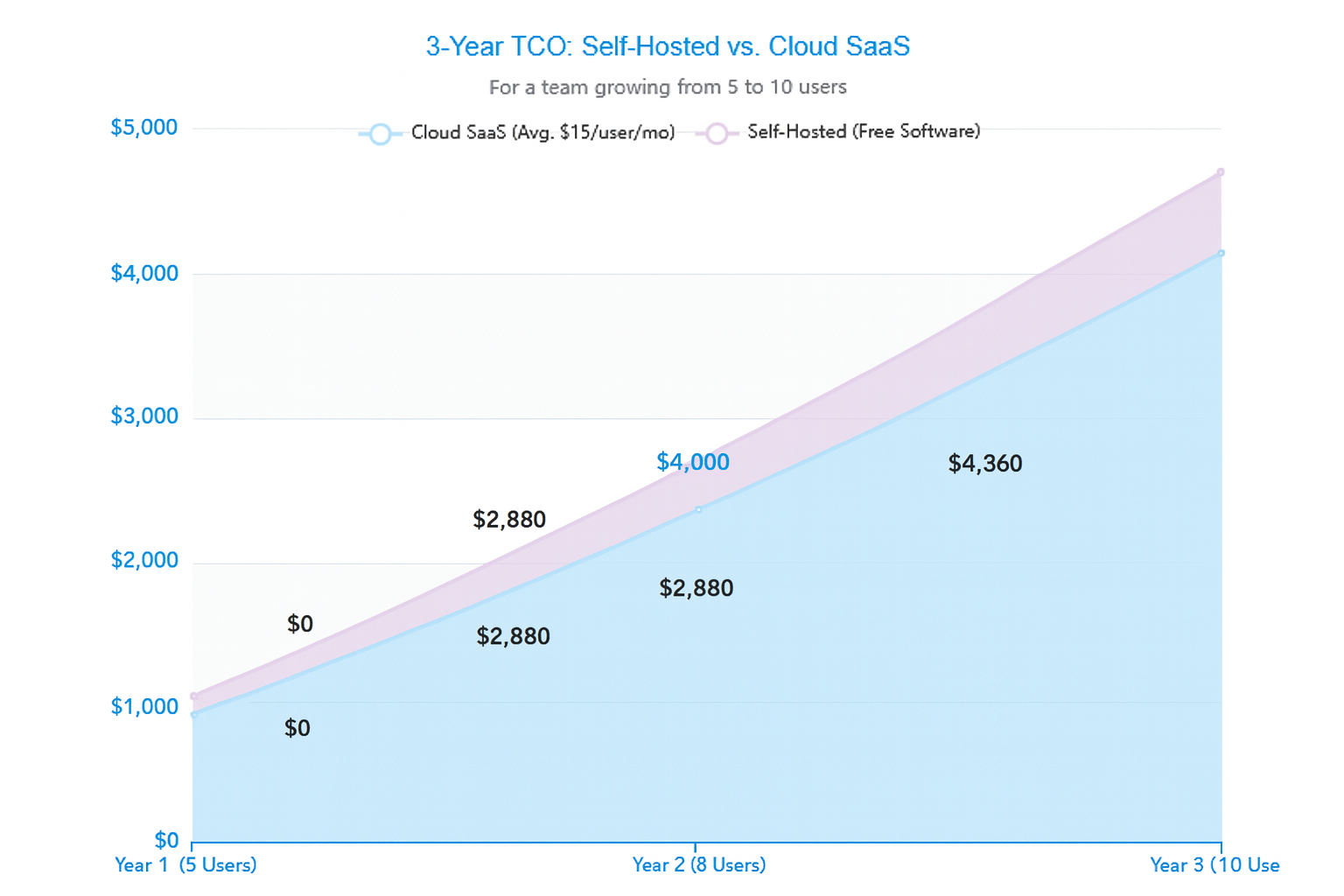
To understand the financial benefits, we must look beyond the initial price tag and consider the Total Cost of Ownership (TCO) over a multi-year period. While a self-hosted solution may have a modest initial setup cost (for server space or a one-time license), it virtually eliminates recurring software fees. A study cited by SlackAlternative.com suggests that while initial costs for self-hosting can be higher, the long-term savings are substantial. Let’s break it down:
- Cloud SaaS Costs: A predictable, but ever-increasing monthly subscription fee. For a tool costing $15/user/month, a 10-person team will pay $1,800 per year. This cost grows linearly with every new hire.
- Self-Hosted Costs: This includes the initial software cost (which can be $0 for open-source or free versions), server hosting (from a low-cost VPS to an existing on-premise server), and minimal time for maintenance. After the initial setup, the ongoing cost is often negligible.
The chart below illustrates the cumulative cost over three years for a team growing from 5 to 10 members. The SaaS model shows a steep, linear increase, while the self-hosted model, especially with a free tool, remains flat and significantly lower.
The “Free for Small Teams” Strategic Advantage
This cost-benefit analysis becomes even more compelling with the availability of powerful, free self-hosted solutions. Tools like the free version of Kendo Manager are not “lite” or crippled versions. They provide a full suite of enterprise-grade features—unlimited users, unlimited projects, Gantt charts, Kanban boards—at zero software cost. This is a game-changer for startups. It means a small team can implement a professional, scalable project management system from day one without allocating any of their precious seed funding to recurring software licenses. This frees up capital for more critical areas like product development, marketing, or hiring new talent.
| Cost Factor | Cloud SaaS (e.g., Asana, Monday.com) | Self-Hosted (e.g., Kendo Manager Free) |
|---|---|---|
| Initial Cost | Low (Free trial, then subscription starts) | Low (Server space, e.g., ~$10–20/month for a VPS) |
| Recurring Cost | High and scales with team size ($10–$25 per user/month) | Very low (Only hosting and minimal maintenance) |
| Cost at Scale (10 users, 1 year) | ~$1,200 – $3,000 | ~$120 – $240 (for hosting) |
| Budget Predictability | Unpredictable with team growth | Highly predictable and stable |
Customize Your Workflow, Not Your Team (Unmatched Flexibility & Control)
Small teams are dynamic and innovative. Their processes are fluid and evolve rapidly as they find what works. Off-the-shelf SaaS tools, with their rigid, one-size-fits-all workflows, often stifle this agility. They force you to adapt your team’s unique processes to fit the software’s limitations. Self-hosted software flips this paradigm: you adapt the software to fit your team.
Beyond Surface-Level Customization
When SaaS tools advertise “customization,” they often mean changing the color scheme or adding a logo. True customization, as offered by many self-hosted platforms, runs much deeper. It means you can:
- Create Custom Fields: Add specific data points to tasks that are unique to your business, such as a “Client ID,” “Invoice Status,” or “Priority Score.”
- Modify Workflows: Define the exact stages a task moves through, from creation to completion. You’re not stuck with a generic “To-Do -> In Progress -> Done” flow if your process is more complex.
- Build Custom Reports: Generate reports that measure the KPIs that matter to *your* business, not just the generic metrics the vendor provides.
This level of tailoring ensures the tool becomes a natural extension of your team’s brain, rather than a cumbersome box you’re forced to work within. As Worklenz points out, “One-size-fits-all rarely works in the project management world. Self-hosted software empowers you to tailor the platform to your team’s unique needs.”
The Power of API and Integration Independence
A significant advantage of many self-hosted solutions is the provision of a powerful REST API. This allows you to create deep, meaningful integrations with your other business-critical systems. For example, a small e-commerce business could use the API to automatically create a project task in their PM tool whenever a large order is placed in their custom-built sales system. Or they could connect it to their billing software to automatically update a task’s status when an invoice is paid. This creates a seamless, automated tech stack that is impossible to achieve when you’re reliant on a SaaS vendor’s limited, pre-built integrations. With a self-hosted tool and its powerful REST API, you are the master of your own ecosystem.
Break Free from Vendor Lock-In (Independence & Long-Term Stability)
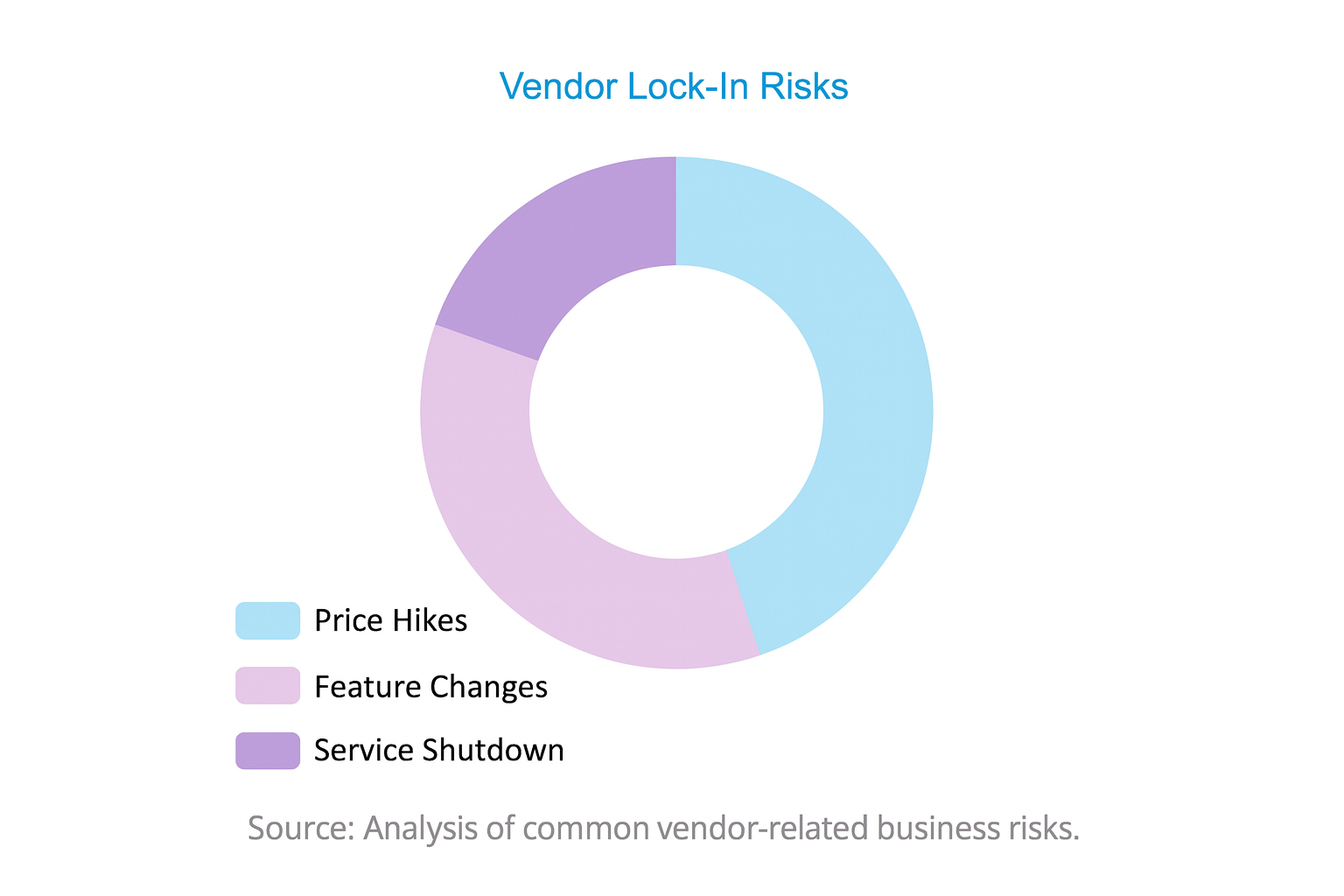
When you build your entire operational workflow around a cloud service, you are placing an immense amount of trust in the vendor. Your project history, your processes, and your team’s daily habits become deeply entwined with their platform. This creates a dangerous dependency known as “vendor lock-in.” If that vendor decides to drastically increase prices, discontinue a critical feature, or even go out of business, you are left in a vulnerable and disruptive position. Self-hosting is the ultimate antidote to this strategic risk.
The Cautionary Tale of Jira Server
Perhaps the most potent real-world example of vendor lock-in risk is Atlassian’s decision to end sales and support for its Jira Server product. As Leantime notes, this move forced thousands of teams who had built their entire development lifecycle around the self-hosted Jira Server into a difficult choice: migrate to a significantly more expensive Data Center or Cloud plan, or risk running an unsupported, potentially insecure system. The migration process itself is a massive undertaking, consuming hundreds of hours of work and causing significant disruption. This single corporate decision highlighted the fragility of relying on a vendor’s long-term product strategy.
The Stability of True Ownership
With a self-hosted tool, you own the software license (or have the right to use it, in the case of open-source). It runs on your infrastructure. You decide when, or if, you want to upgrade. The software will remain available and functional for as long as you choose to run it. This provides an unparalleled level of long-term planning reliability and operational stability. Your business is insulated from the whims of a vendor’s pricing strategies, feature deprecations, or corporate acquisitions. This independence is not just a convenience; it’s a cornerstone of a resilient business strategy, ensuring that the tools you rely on today will still be there for you tomorrow, on your terms.
Key Takeaways: Why Self-Hosted Wins for Small Teams
- Total Data Control: Your data stays on your servers, ensuring compliance with regulations like GDPR/HIPAA and protecting client privacy.
- Long-Term Affordability: Avoids escalating monthly subscription fees, offering a much lower Total Cost of Ownership (TCO), especially with free options like Kendo Manager.
- Unmatched Customization: Adapt the software to your team’s unique workflow, not the other way around. Integrate with your existing tools via API.
- Strategic Independence: Frees you from vendor lock-in, protecting your business from unexpected price hikes, feature changes, or service discontinuation.
Essential Features for Small Team Self-Hosted PM Software
Choosing a self-hosted tool is the first step. The next is ensuring it has the right feature set to empower your team, not overwhelm them. For a small, agile team, the ideal solution strikes a perfect balance between powerful functionality and intuitive ease of use. Here are the non-negotiable features you should look for.
Core Project & Task Management
This is the heart of any project management system. It’s the ability to break down large, complex goals into manageable pieces of work and track them through to completion. Without a robust core, everything else is just window dressing.
Key Features to Demand:
- Kanban Boards: A must-have for teams that value a visual approach to workflow management. Kanban boards allow you to represent tasks as cards and move them through different stages of your process (e.g., “Backlog,” “In Progress,” “Review,” “Done”). This provides an instant, at-a-glance understanding of project status and helps identify bottlenecks. Tools like Kendo Manager’s Kanban board are essential for agile teams.
- Gantt Charts: For projects with clear timelines and dependencies, Gantt charts are indispensable. They provide a timeline view of the entire project, showing how tasks relate to one another. If Task B cannot start until Task A is finished, a Gantt chart makes this dependency visually clear, helping to prevent delays and plan schedules accurately. Look for interactive Gantt charts where you can drag and drop tasks to adjust schedules.
- Detailed Task Management: The ability to add rich detail to each task is crucial. This includes assigning tasks to specific team members, setting start and due dates, defining priorities (e.g., Low, Medium, High), creating subtasks or checklists for granular work, and attaching relevant files directly to the task.
Team Collaboration & Communication
In a small team, members often wear multiple hats and work closely on various initiatives. Effective communication is the glue that holds everything together. A good PM tool should centralize communication, pulling it out of scattered email inboxes and chat apps and tying it directly to the work being done.
Key Features to Demand:
- Task Comments & @Mentions: The ability to have conversations directly on a task card is transformative. It keeps all context, questions, and decisions in one place, creating a single source of truth. The ability to @mention a teammate to draw their attention to a specific comment ensures nothing gets missed.
- Centralized File Sharing: All project-related documents, mockups, and spreadsheets should be stored within the project space, linked to the relevant tasks. This eliminates the frustrating hunt for the “latest version” of a file in someone’s email or local drive.
- Real-Time Notifications: An intelligent notification system is key to keeping everyone in the loop without creating noise. Users should receive alerts for important events like being assigned a new task, being mentioned in a comment, or when a deadline is approaching.
According to a report by the Project Management Institute (PMI), effective communication is consistently cited as a critical factor for project success. Centralizing this within a PM tool reduces misunderstandings and aligns the team.
Reporting & Analytics
You can’t improve what you don’t measure. For a small team, data-driven decision-making is not a luxury; it’s a survival mechanism. Your PM software must provide clear insights into project progress, team performance, and resource allocation.
Key Features to Demand:
- Customizable Dashboards: A high-level dashboard should be the first thing you see when you log in, providing an at-a-glance overview of project health. Look for the ability to customize these dashboards with widgets showing task status, project timelines, budget tracking, and team workload. Powerful dashboards give managers instant visibility.
- Time Tracking: This is essential for multiple reasons. It helps in accurately billing clients for project work, analyzing team productivity to understand how long tasks actually take, and improving future project estimates. Time tracking should be simple to use, ideally integrated directly into tasks.
- Resource Management: A critical challenge for small teams is avoiding burnout. Resource management features provide a view of each team member’s workload across all projects. This allows managers to see who is over-allocated and reassign tasks to balance the work, ensuring team well-being and sustainable productivity.
Ease of Installation & Maintenance
A small team rarely has a dedicated IT or DevOps department. Therefore, the self-hosted software you choose must be straightforward to install and maintain. A tool that requires a Ph.D. in server administration to get running is a non-starter.
Key Considerations:
- Clear and Comprehensive Documentation: The vendor or community must provide detailed, step-by-step installation guides. This should include server prerequisites, configuration steps, and troubleshooting tips.
- Reasonable System Requirements: The software should be able to run efficiently on standard, affordable server configurations. It shouldn’t require an exotic or prohibitively expensive hardware setup. Many tools can be run on a simple Linux VPS (Virtual Private Server) for a low monthly cost.
- Active Support Channels: Whether it’s a community forum, a public issue tracker, or paid vendor support, there must be a clear path to getting help when you run into issues. An active community is often a sign of a healthy, well-maintained project.
Top Self-Hosted Project Management Tools for Small Teams
Now that we’ve established the ‘why’ and the ‘what’, let’s explore the ‘who’. The market for self-hosted project management software is vibrant, with several excellent options that cater specifically to the needs of small teams. Here’s a curated list of the best on-premise tools that empower you with control, flexibility, and powerful features, with a special focus on solutions that offer outstanding value.
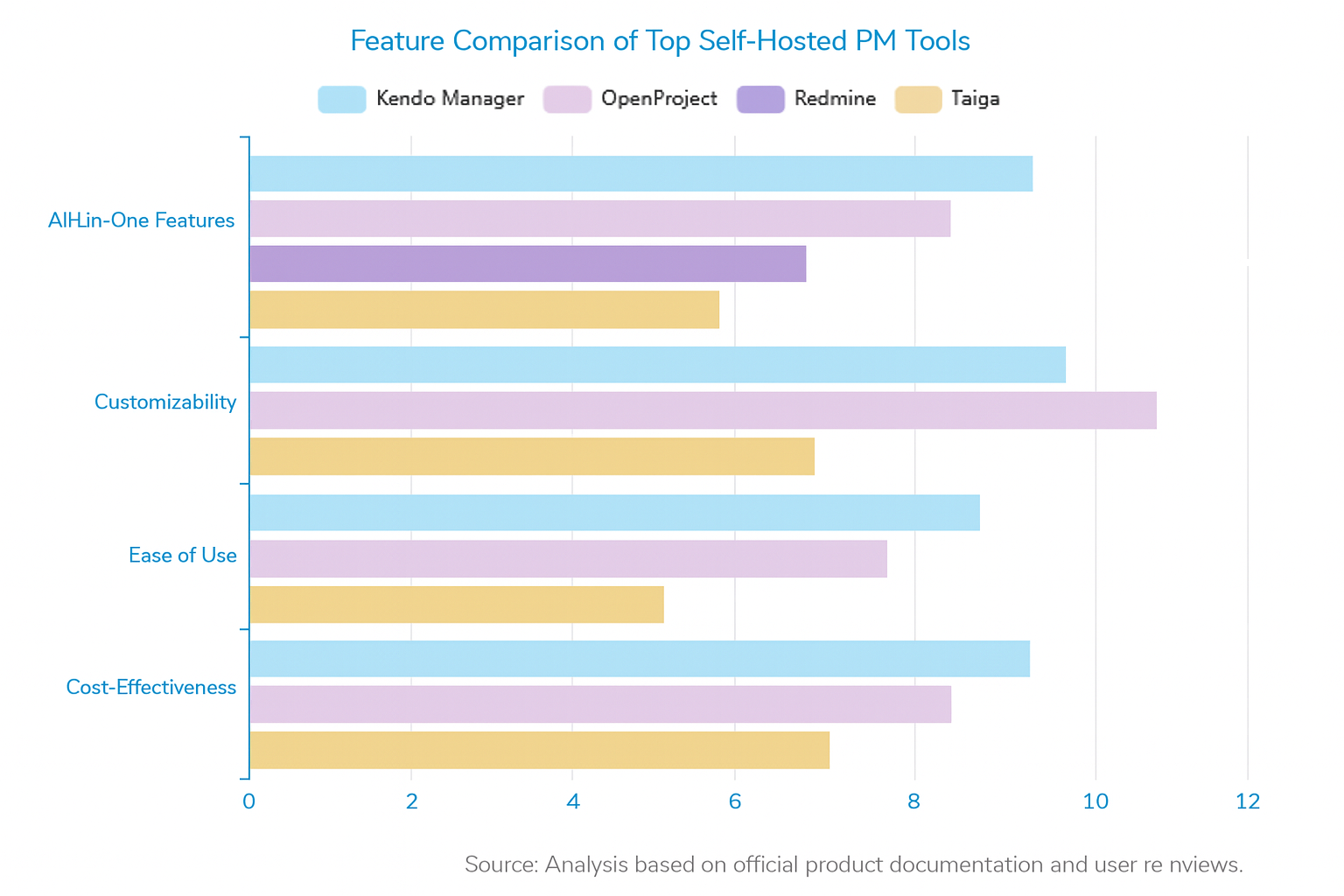
Kendo Manager: The All-in-One Powerhouse (with a Free Version)
Overview: Kendo Manager stands out as a comprehensive self-hosted project management software designed to scale from small teams to large enterprises. Its most compelling proposition for our audience is its unique offering: a free, full-featured version specifically tailored for small teams and startups. This isn’t a stripped-down trial; it’s an enterprise-level platform without the enterprise price tag.
How it Solves Small Team Problems:
- Budget Constraints: The free version completely eliminates software licensing costs, a massive and immediate advantage for any budget-conscious team. It allows you to channel funds into growth rather than overhead.
- Need for Control & Security: As a purely self-hosted solution, it guarantees 100% data ownership. You deploy it on your own server, giving you complete control over security protocols and ensuring compliance with data privacy regulations.
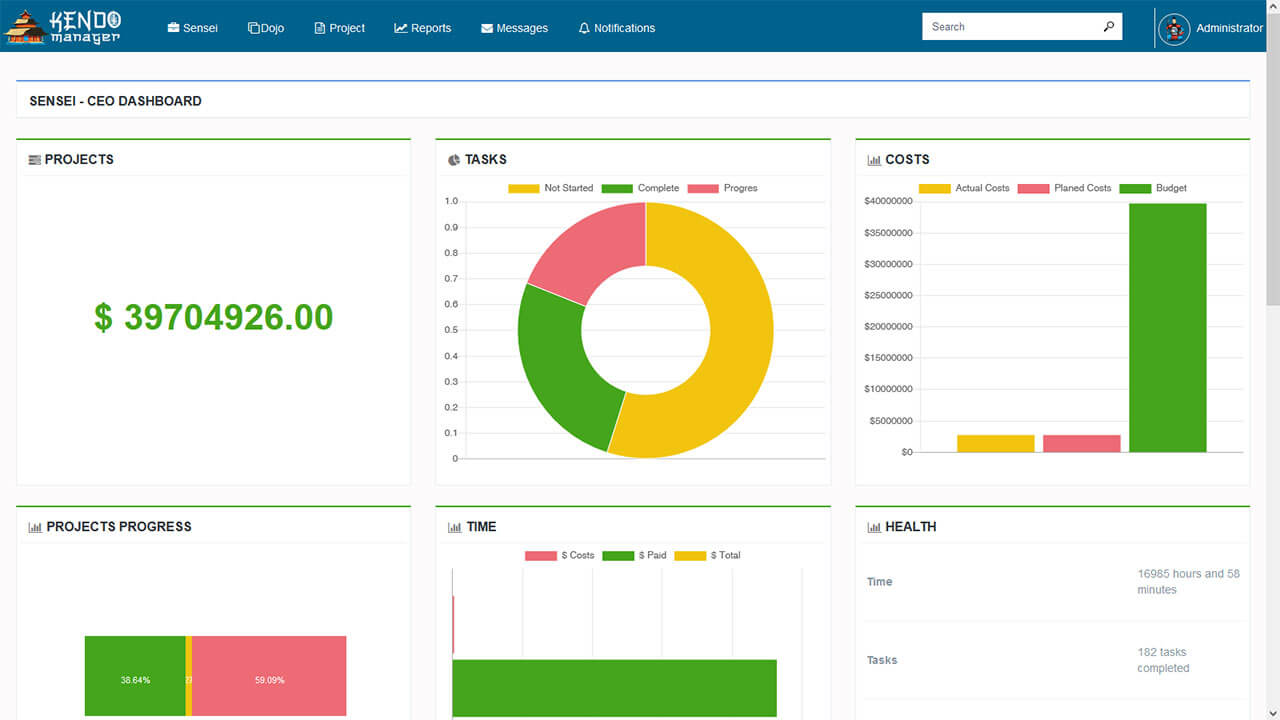
- Tool Sprawl: Small teams often juggle multiple, disconnected tools (one for tasks, one for time tracking, another for budgeting). Kendo Manager integrates Task, Cost, and Risk Management, along with Gantt, Kanban, and reporting, into a single, cohesive platform.
- Usability: Despite its powerful feature set, Kendo Manager is designed with an intuitive interface, which significantly reduces the learning curve and encourages team adoption.
Key Features of the Free Version:
-
- Unlimited Users & Projects: Unlike SaaS tools that charge per seat, the free version allows your team to grow without ever hitting a paywall.
– Interactive Gantt & Kanban Views: Supports both traditional and agile project management methodologies right out of the box.
– Comprehensive Management Modules: Includes not just task management, but also cost, risk, and change management.
– Powerful Reporting Dashboards: Provides real-time insights into project status and performance.
For a small team looking for the most power, control, and long-term value, Kendo Manager presents an almost unbeatable proposition. It delivers the benefits of a premium, paid tool with the cost-effectiveness of an open-source solution.
OpenProject: The Open-Source Agile & Classic PM Tool
Overview: OpenProject is a leading open-source project management software celebrated for its robust support for the entire project lifecycle. It’s particularly strong for teams that need to blend classic (waterfall) planning with agile (Scrum, Kanban) execution. Built in the EU, it has a heavy focus on data security and privacy, aligning perfectly with the self-hosting ethos.
Best For:
Tech-savvy teams, particularly in software development, engineering, or any field that requires a highly secure and customizable environment. It’s a great choice for those who appreciate the transparency and flexibility of open-source technology.
Key Features:
- Hybrid Methodologies: Seamlessly manage project timelines with Gantt charts while tracking daily work on agile boards and backlogs.
- Time and Cost Tracking: Integrated modules for logging work hours and tracking project budgets.
- Powerful REST API: As highlighted by their community, the API is a core strength, enabling deep integrations with other systems.
- High Security Standards: Adherence to GDPR and a commitment to data sovereignty.
Considerations:
The free Community edition is very powerful, but some of the most sought-after features, such as advanced agile boards and project portfolio management, are part of the paid Enterprise version. The sheer breadth of features can also mean a steeper learning curve compared to simpler tools.
Redmine: The Highly Flexible & Customizable Framework
Overview: Redmine is a free, open-source project and issue tracking tool written using the Ruby on Rails framework. It is less of a polished, out-of-the-box product and more of a flexible framework. Its true power lies in its incredible adaptability and the vast ecosystem of community-created plugins that can extend its functionality in almost any direction.
Best For:
Development teams, IT departments, and system administrators who are comfortable with a more technical setup process and want ultimate control to build a tool that perfectly matches their specific needs.
Key Features:
- Multi-Project Support: Manage all your projects from a single instance with configurable per-project modules.
- Role-Based Access Control: Fine-grained control over what users can see and do.
- Integrated Issue Tracking: A powerful system for bug tracking and managing development tasks.
- Extensibility via Plugins: The community offers plugins for everything from agile boards to helpdesk features.
Considerations:
The default user interface can feel dated and less intuitive than modern alternatives. Achieving a feature-rich setup heavily relies on finding, installing, and maintaining third-party plugins, which can be a technical and time-consuming effort.
Taiga: The Simple & Intuitive Agile Tool
Overview: Taiga is an open-source project management platform that was designed from the ground up with a strong focus on user experience and agile principles. It is widely praised for its beautiful, clean, and intuitive interface, which makes it a joy to use for development teams.
Best For:
Startups and agile software development teams who prioritize simplicity, a great user experience, and a tool that is purely focused on managing Scrum and Kanban projects effectively.
Key Features:
- Elegant Kanban and Scrum Boards: Visually appealing and highly functional boards for managing sprints and workflows.
- Epics and User Story Management: Well-designed modules for managing the agile hierarchy of work.
- Developer Tool Integrations: Connects seamlessly with popular tools like GitHub, GitLab, and Bitbucket.
- Comprehensive API: Offers a good API for custom integrations.
Considerations:
Taiga’s strength is also its limitation. It is hyper-focused on agile software development. Teams looking for broader, more traditional project management features like in-depth cost management, resource planning, or client invoicing will find it lacking compared to an all-in-one solution like Kendo Manager.
How to Implement Your Self-Hosted PM Tool: A Simple 4-Step Guide
Making the switch to a self-hosted project management tool might sound daunting, but it’s far more accessible than you think. You don’t need a large IT department or a deep technical background. By following a structured approach, your small team can be up and running in no time. Here’s a straightforward process for getting your new software deployed and adopted.
1. Assess Your Needs & Choose Your Tool
This foundational step is the most critical. Before you download any software or rent any server space, you must define what success looks like for your team.
- List Your “Must-Haves”: Gather your team and create a prioritized list of features. Do you absolutely need Gantt charts for your project timelines? Is time tracking for client billing a non-negotiable? Do you require robust cost management features? Be honest about what you’ll actually use.
- Evaluate the Candidates: Using your feature list, evaluate the tools mentioned above. Consider your team’s technical comfort level. If you want ultimate flexibility and have a developer on your team, Redmine might be an option. If you want a powerful, all-in-one solution that’s easy to manage, Kendo Manager is a stronger choice.
- The Low-Risk Path: For most small teams, the logical starting point is the option with the lowest risk and highest potential reward. Starting with a powerful free option like Kendo Manager’s free version allows you to get a full-featured system running without any financial commitment.
2. Prepare Your Hosting Environment
The term “server” can be intimidating, but in reality, you have several flexible and affordable options. You don’t need a blinking server rack in a cold room.
- On-Premise Hardware: If you have an existing office server or even a reliable, always-on desktop PC, you can often use it to host your PM software. This is a great way to leverage hardware you already own.
- Private Cloud Server (VPS): This is the most popular and flexible option. For a small monthly fee (often $10-$20), you can rent a Virtual Private Server (VPS) from a provider like DigitalOcean, Vultr, Linode, or a local hosting company. You get a clean, dedicated server environment that you control completely.
- Check the Requirements: Before committing to a hosting option, carefully review the software’s documentation for its system requirements. This will specify the supported operating systems (e.g., Windows Server, Linux), database software (e.g., Microsoft SQL Server, MySQL), and web server (e.g., IIS, Apache).
3. Install and Configure the Software
This is the most hands-on step, but modern tools have streamlined the process significantly. Following the documentation is key.
- Follow the Guide: The installation process is typically well-documented. For example, the Kendo Manager Installation Guide provides clear, step-by-step instructions.
- The General Process:
- Download the software package from the official website.
- Upload the files to your server.
- Create a database and a database user with the necessary permissions.
- Run an installation script or visit a setup URL in your web browser.
- Follow the on-screen prompts to configure the database connection, administrator account, and basic settings.
- Post-Installation: Once installed, configure your SMTP settings for email notifications, set up user accounts, and define roles and permissions.
4. Onboard Your Team and Drive Adoption
The best tool in the world is useless if no one uses it. The final step is to thoughtfully introduce the software to your team and make it an integral part of their workflow.
- Start Small: Don’t try to migrate all your projects at once. Pick one or two new or small ongoing projects to manage exclusively in the new tool. This creates a low-pressure learning environment.
- Hold a Kick-off Training: Schedule a 60-minute session to walk the team through the core functionalities. Focus on the “day-in-the-life” workflows: how to create a task, how to comment, how to update progress, and where to find their work.
- Lead by Example: As a manager, you must use the tool consistently. All new tasks and project communications should be initiated through the platform. If you revert to email, so will your team.
- Gather Feedback and Iterate: The initial setup is not final. Encourage your team to provide feedback. Are the workflow stages correct? Are the notifications too noisy or too quiet? Use this feedback to fine-tune the configuration, making the tool work better for everyone.
Take Control of Your Projects Today
For small teams navigating the complexities of modern business, choosing the right project management software is not merely a tactical choice—it’s a critical strategic decision that impacts budget, security, and agility. While the siren song of cloud SaaS is loud, it often leads to a path of escalating costs, data vulnerability, and a frustrating loss of control. By opting for a self-hosted solution, you are not just selecting a tool; you are adopting a powerful strategy of independence, security, and long-term cost-efficiency.
You reclaim ownership of your most valuable asset—your data. You gain the freedom to mold your tools to fit your unique processes, not the other way around. Most importantly, you build a resilient operational foundation that allows you to scale your team without exponentially scaling your monthly bills. This is how smart, agile teams build a sustainable competitive advantage.
Ready to make the switch from chaos to control? The path forward is clear and accessible. Explore Kendo Manager’s free self-hosted version today and discover how enterprise-grade project management can be powerful, affordable, and perfectly tailored to your small team’s ambitious goals.
Frequently Asked Questions (FAQ)
What is the main difference between self-hosted and cloud-based project management software?
The primary difference is where the software and your data are stored. With cloud-based software, the vendor hosts everything on their servers, and you access it via the internet for a recurring subscription fee. With self-hosted software, you install and run the application on your own server infrastructure (either on-premise or a private cloud). This gives you complete control over your data, security, and customization, typically for a one-time cost or for free.
Is self-hosted software difficult for a small team to maintain?
It can vary, but modern self-hosted tools have become much easier to maintain. While it does require some initial setup, many applications provide clear documentation and can run on standard, affordable hosting. For a small team, the maintenance typically involves periodic software updates and regular data backups, which is a manageable task for someone with basic IT knowledge. The long-term benefits of control and cost savings often outweigh the minimal maintenance effort.
How does Kendo Manager’s free version benefit startups and small teams?
Kendo Manager’s free self-hosted version is specifically designed to empower startups and small teams by removing the cost barrier to professional project management. It provides unlimited users and projects along with a comprehensive set of features—including task management, Gantt charts, Kanban boards, and cost tracking—that are typically found only in expensive, paid enterprise software. This allows a small team to implement a robust, secure, and scalable project management system from day one without any software budget.
Can I migrate from a cloud tool like Trello or Asana to a self-hosted solution?
Yes, migration is possible, though the process varies. Most cloud tools allow you to export your project data, usually in CSV or JSON format. Many self-hosted tools, including Kendo Manager, have import features that can help you bring this data into the new system. While it may require some data mapping and cleanup, moving your project history to a self-hosted platform is a common step for teams looking to gain more control and reduce costs.
Reference
[1] Top 5 benefits of using Redmine at software development …
[2] OpenProject – Open Source Project Management Software
[3] Project Collaboration Software Features
[4] Why to self-host your software? Should you go for on- …
[5] Self-Hosted Project Management Software for Your Team
[6] Global Project Management Job Trends 2024
[7] What is Self-Hosted Software | An Overview with Pros and …
[8] Self-Hosting vs. Cloud: Cost Breakdown – Slack Alternatives
[9] Benefits of Self-Hosting Your Project Management Tool
[10] Taiga: Your opensource agile project management software

