
Self-hosted PMO software runs the full project management office stack — portfolio governance, RAID tracking (risks, issues, changes), resource planning, cost control, and reporting — on your own server instead of a vendor’s cloud.
Demand for on-premise project portfolio management (PPM) is rising fastest in regulated sectors, where data sovereignty and GDPR obligations make third-party hosting a liability. This comparison is written for PMO leads, IT-governed teams, and organizations in healthcare, finance, and public administration that must keep project data inside their own infrastructure. Below are 8 self-hosted PMO tools compared across deployment, data ownership, PMO depth, and pricing model — plus the 6 features that separate a real PMO platform from a task tracker.
Demand for project portfolio management is also moving beyond simple task tracking. According to MarketsandMarkets’ PPM market forecast, the global project portfolio management market is expected to grow from USD 9.91 billion in 2026 to USD 16.87 billion by 2031, at a CAGR of 11.3%. For regulated organizations, this growth increases the need for PMO platforms that combine portfolio governance, RAID tracking, resource planning, cost control, and secure data ownership.
Why do PMOs choose self-hosted software over cloud SaaS?
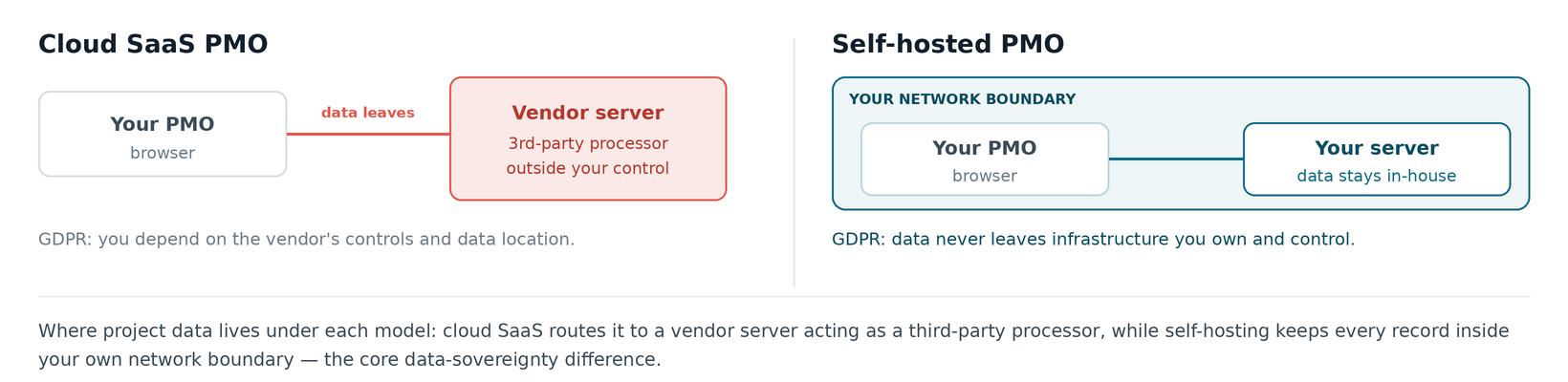
PMOs choose self-hosted software for three measurable reasons: data ownership, fixed cost, and control. With on-premise deployment, every project record stays on hardware the organization controls, which removes the third-party data processor that cloud tools introduce — a direct advantage for GDPR compliance and ISO 27001 data-handling requirements. Self-hosting also replaces the per-seat monthly subscription with a one-time license, so a 100-person PMO is not penalized for adding stakeholders.
The trade-off is responsibility: your team handles installation, backups, and updates instead of the vendor. For PMOs already running internal infrastructure, that cost is marginal next to the governance and budget control they gain.
What 6 features define real PMO software (not just task management)?
Real PMO software covers six capabilities a task tracker does not: portfolio rollup, RAID management, resource and capacity planning, cost and budget variance, governance and methodology support (PMBOK, PRINCE2), and multi-level dashboards. A tool that offers only boards and task lists manages work; a PMO platform manages a portfolio against strategy.
The two-tier dashboard view below shows the difference in practice. The executive layer answers “is the portfolio healthy?” while the operational layer answers “is this project under control?”
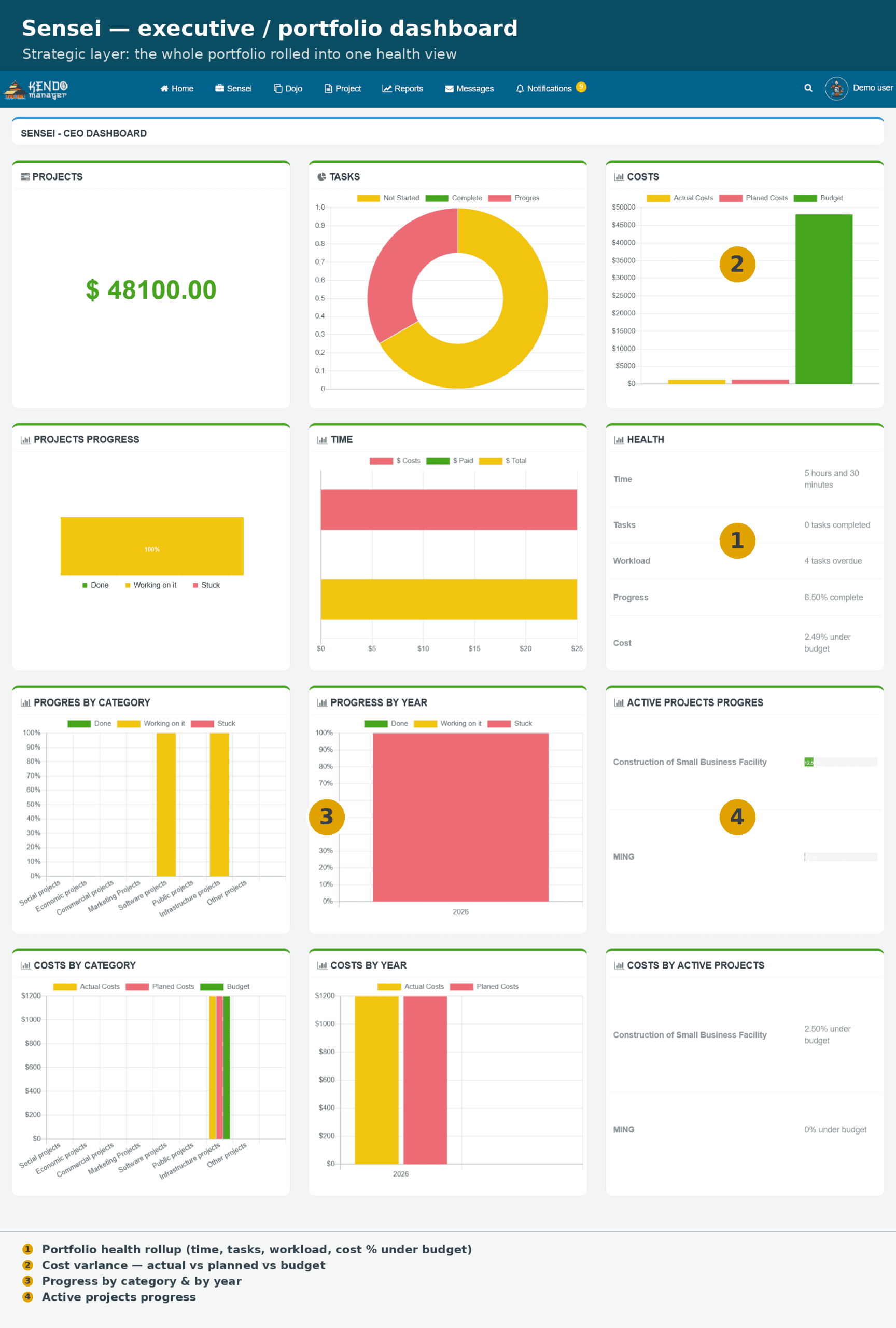
The Sensei executive dashboard rolls every active project into one portfolio-health view — the governance layer most self-hosted tools lack.
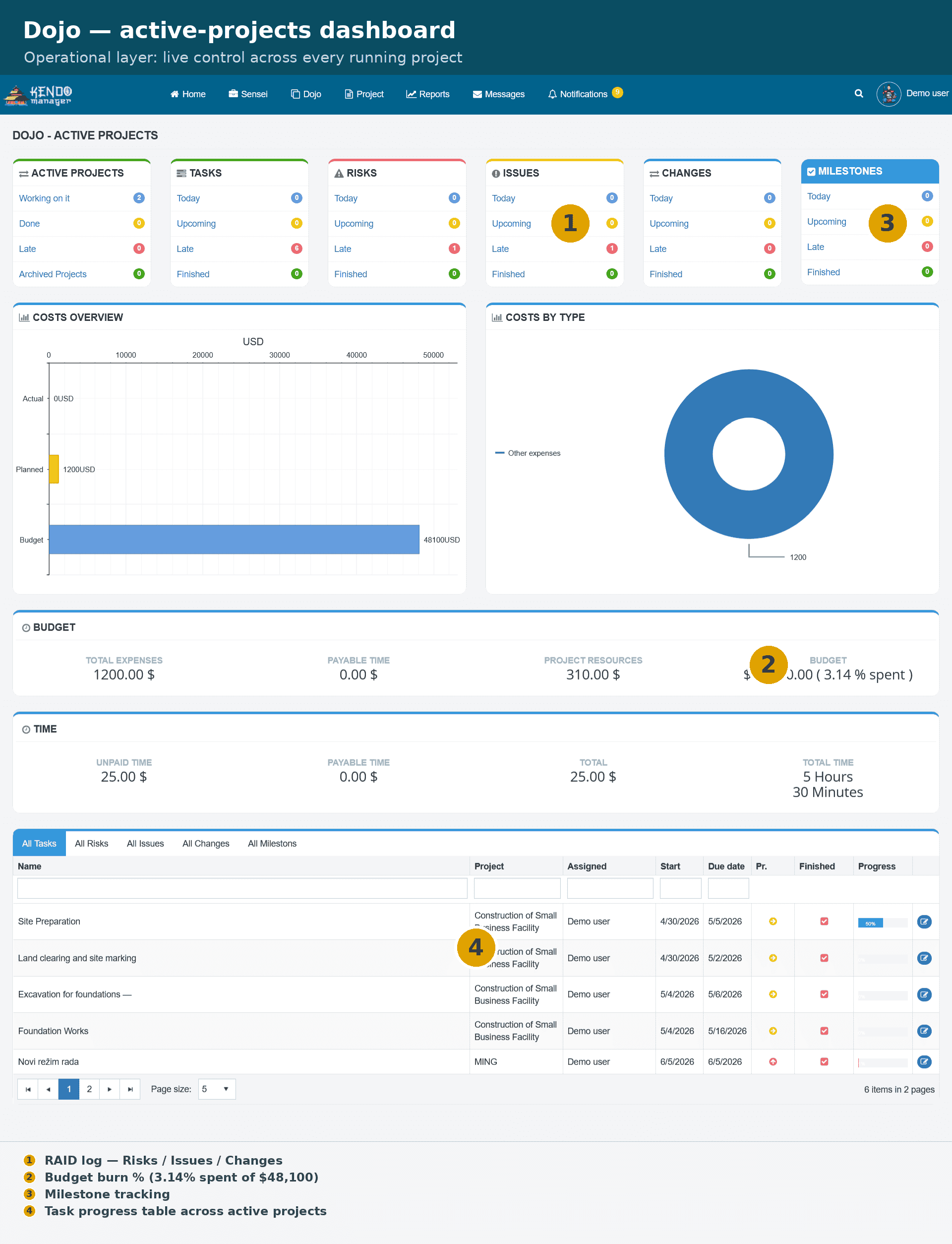
The Dojo dashboard is the operational layer: live RAID counts, budget burn, time logged, and milestone status across every active project.
Together these two views are the PMO test — strategic portfolio oversight sitting above operational control. Tools that stop at task boards fail it.
Which 8 self-hosted PMO tools are worth comparing in 2026?
Eight on-premise PMO and PPM platforms stand out in 2026, ranging from open-source frameworks to bundled commercial licenses. Each entry lists what it does well and where it falls short, so the choice maps to your team rather than a feature count.
1. What makes Kendo Manager a full PMO platform rather than a task tracker?
Kendo Manager installs on your own Windows server and bundles every feature in each license: Gantt, Kanban, time tracking, costs, budgeting, resources, issues, risks, change management, and reports. Its Sensei (portfolio) and Dojo (operational) dashboards give PMOs the strategic-plus-operational view that most self-hosted tools miss.
- Best for: PMOs wanting full PPM depth on-premise without per-user fees or feature tiers.
- Deployment: Self-hosted, web-based, Windows stack; simpler install than most open-source options.
- PMO depth: Portfolio rollup, RAID, resource and cost management, Waterfall and Agile.
- Pricing model: One-time license per package, unlimited projects, free tier for 10 users and 1 project.
- Limitation: Runs on a Windows stack and has a smaller third-party ecosystem than Jira.
2. Who should choose OpenProject?
A mature open-source PPM platform, OpenProject ships a free Community edition and a paid Enterprise on-premise edition for support and add-ons, though it stays Linux-oriented and demands more setup effort.
- Best for: Linux-comfortable teams wanting open-source with optional paid support.
- Deployment: Self-hosted (Community free; Enterprise on-premise paid).
- PMO depth: Strong project and portfolio features; some governance behind Enterprise.
- Pricing model: Free Community core; Enterprise priced per user — check current rates.
- Limitation: Installation and maintenance require Linux experience.
3. Where does Redmine fit as PMO software?
Plugin extensibility is Redmine’s defining strength. This long-standing open-source tool builds PMO capability from community plugins rather than a bundled core, and its interface shows its age.
- Best for: Developer-led teams that will customize via plugins.
- Deployment: Self-hosted, open-source.
- PMO depth: Basic out of the box; portfolio and risk features depend on plugins.
- Pricing model: Free; cost is in setup and plugin maintenance.
- Limitation: Dated UI and plugin dependency for true PMO functions.
4. Is Jira Data Center worth the cost for a PMO?
Atlassian positions Jira Data Center as its self-hosted route after Jira Server’s end of life. The platform handles agile delivery well, but full PPM usually means paid Marketplace apps on top of an already high license.
- Best for: Large agile organizations standardized on Atlassian.
- Deployment: Self-hosted Data Center license.
- PMO depth: Agile-strong; portfolio management via add-ons.
- Pricing model: Tiered by user count, scaling steeply — check current rates.
- Limitation: High total cost once PPM apps are added.
5. Why was ProjeQtOr built around the PMO?
Unlike most tools here, ProjeQtOr was designed around the PMO and quality management from the start, with risk, issue, and ticket tracking included rather than bolted on.
- Best for: Quality- and governance-focused PMOs on a budget.
- Deployment: Self-hosted (PHP).
- PMO depth: Built-in risk, quality, and tracking; genuine PMO orientation.
- Pricing model: Free open-source; paid support available.
- Limitation: Dense interface and a steeper learning curve.
6. Is Leantime enough for a small PMO?
Small PMOs are Leantime’s target. This open-source platform links strategy, goals, and tasks in a clean interface, and suits modest teams more than large, complex portfolios.
- Best for: Small teams wanting strategy-to-execution without heavy setup.
- Deployment: Self-hosted, open-source.
- PMO depth: Goals and projects strong; limited deep PPM and resource leveling.
- Pricing model: Free self-hosted; paid cloud and support tiers.
- Limitation: Not built for large multi-portfolio governance.
7. How mature is Plane for PMO use?
Among the newer entrants, Plane pairs a modern interface with a self-hosting option, strongest on agile and issue tracking, while some PMO features remain on the roadmap.
- Best for: Teams wanting a modern UI and active open-source development.
- Deployment: Self-hosted (Community) or commercial editions.
- PMO depth: Agile and tracking solid; portfolio and cost features still developing.
- Pricing model: Free Community; commercial tiers for upgrades.
- Limitation: Maturing feature set; some capabilities not yet live.
8. How does OrangeScrum’s module pricing affect PMO cost?
OrangeScrum offers a self-hosted edition built around scrum, where extra capabilities arrive as paid modules rather than a single bundled license.
- Best for: Scrum teams comfortable buying capability module by module.
- Deployment: Self-hosted edition available.
- PMO depth: Task and scrum core; PMO features via paid add-ons.
- Pricing model: Paid per module on top of the base.
- Limitation: Feature fragmentation across modules raises real cost.
How do the 8 self-hosted PMO tools compare at a glance?
| Tool | Deployment | Data ownership | PMO depth | Pricing model |
|---|---|---|---|---|
| Kendo Manager | Self-hosted (Windows) | Full, on your server | Portfolio + RAID + cost, bundled | One-time license, unlimited projects |
| OpenProject | Self-hosted (Linux) | Full, on your server | Strong, some features behind Enterprise | Free core, per-user Enterprise |
| Redmine | Self-hosted (open-source) | Full, on your server | Basic, plugin-dependent | Free, setup-heavy |
| Jira Data Center | Self-hosted / Data Center license | Full, on your infrastructure | Agile core, PPM via apps | Tiered per user, scaling steeply |
| ProjeQtOr | Self-hosted (PHP) | Full, on your server | Built-in risk and quality | Free, paid support |
| Leantime | Self-hosted (open-source) | Full, on your server | Strategy and tasks, light PPM | Free, paid tiers |
| Plane | Self-hosted (Community) | Full, on your server | Agile core, maturing PPM | Free core, commercial tiers |
| OrangeScrum | Self-hosted edition | Full, on your server | Scrum core, modular PMO | Paid per module |
How much does self-hosted PMO software cost in 2026?
Self-hosted PMO software costs range from free open-source cores to one-time licenses in the low thousands, with total cost of ownership (TCO) decided by setup effort and per-user policy rather than sticker price. Open-source tools (Redmine, ProjeQtOr, Leantime, Plane Community) carry no license fee but add staff time for installation, maintenance, and — for several — paid support to be production-ready.
Kendo Manager uses one-time pricing with every feature and unlimited projects included:
| Plan | Price (one-time) | Users |
|---|---|---|
| Free Version | $0 | 10 users · 1 active project |
| Startup | $749 | 10 users |
| Office | $1,249 | 20 users |
| Business | $2,499 | 50 users |
| Business Pro | $3,799 | 100 users |
| Professional | $6,299 | Unlimited users |
Against a per-seat cloud subscription, a one-time license overtakes recurring fees once the subscription total passes the license price — for a 50-user PMO that point typically falls inside the first two years, after which the on-premise cost is effectively zero.
How is this calculated?
Subscription cost after m months = users × seat price × m. Self-hosted cost = one-time license + (annual server ÷ 12) × m. Break-even is the month where the two are equal: m = license ÷ (users × seat price − server ÷ 12). If the annual server cost is higher than the yearly subscription, the lines never cross.
How do you choose the right self-hosted PMO tool using 4 criteria?
Match the tool to four constraints: your stack, your governance depth, your per-user growth, and your setup capacity. Use this checklist:
- Stack fit: Windows-first teams favor Kendo Manager; Linux-comfortable teams can run OpenProject or Redmine.
- PMO depth: Rule out task-only and plugin-dependent tools if you need portfolio rollup and RAID out of the box.
- Per-user economics: Growing headcount makes one-time licensing cheaper than per-seat subscriptions over a 2–3 year horizon.
- Setup capacity: Limited IT time favors a bundled, simpler install over an open-source framework you assemble yourself.
Start every shortlist by requesting the Kendo Manager trial version, so you test the dashboards and RAID workflow against a real portfolio before committing.
Frequently asked questions
What is the difference between PMO software and project management software?
PMO software governs an entire portfolio — strategic alignment, resource allocation, risk monitoring, and cross-project reporting — while project management software runs one project’s tasks and schedule. PMO software adds the portfolio rollup and governance layer that task tools lack.
Is self-hosted PMO software better for GDPR compliance?
Self-hosting keeps project data on your own infrastructure, removing the third-party processor that cloud tools introduce. That simplifies GDPR and data-sovereignty obligations, though your organization then owns the security controls.
Is there free self-hosted PMO software?
Yes. Redmine, ProjeQtOr, Leantime, and Plane Community are free open-source options, and Kendo Manager offers a free version for up to 10 users and 1 project. Open-source “free” still carries setup and maintenance cost.
Do self-hosted PMO tools charge per user?
It varies. Jira Data Center and OpenProject Enterprise scale per user, while Kendo Manager uses a one-time license per package with unlimited projects and no recurring per-seat fee.
Can small teams use PMO software?
Yes. Small PMOs benefit from standardized workflows, centralized reporting, and portfolio visibility, and several tools (Leantime, Kendo Manager’s free tier) are sized for small teams that expect to scale.
Which self-hosted PMO tool is easiest to install?
Bundled commercial tools like Kendo Manager install more simply than open-source frameworks such as OpenProject or Redmine, which require Linux experience and manual configuration.

