
The Ultimate Guide to Self-Hosted Project Management Software for Construction
Every construction project comes with moving parts: schedules that shift, budgets that need constant control, teams working across different locations, and documents that must always be accurate and accessible. When these processes are managed through disconnected tools or generic cloud platforms, delays, miscommunication, and data risks become much harder to avoid. This is where Self-Hosted Project Management Software for Construction becomes a powerful advantage — giving construction companies full control over their data, workflows, infrastructure, and project execution from planning to completion.
Table of Contents
- Introduction: Taming the Chaos of Construction Projects
- Why Self-Hosted PM Software is a Game-Changer for Construction
- Unbreakable Control Over Your Most Sensitive Data
- Customization That Bends to Your Workflow, Not the Other Way Around
- A Financially Sound Investment for the Long Haul
- Reliability and Access, Even When the Internet Fails
- Core Features: The Blueprint for a Successful Construction PM Tool
- Project Planning and Scheduling: From Gantt Charts to Critical Path
- Cost Management and Financial Control: Keeping Budgets in the Black
- Centralized Document Management: The Single Source of Truth
- Team Collaboration and On-Site Communication: Bridging the Office and the Field
- Risk and Issue Management: Expecting the Unexpected
- In-Depth Analysis: Top Self-Hosted Project Management Solutions for Construction
- A Step-by-Step Guide to Implementing Your Self-Hosted PM Software
- Conclusion: Build Your Future on a Foundation of Control and Efficiency
- Frequently Asked Questions (FAQ)
Taming the Chaos of Construction Projects
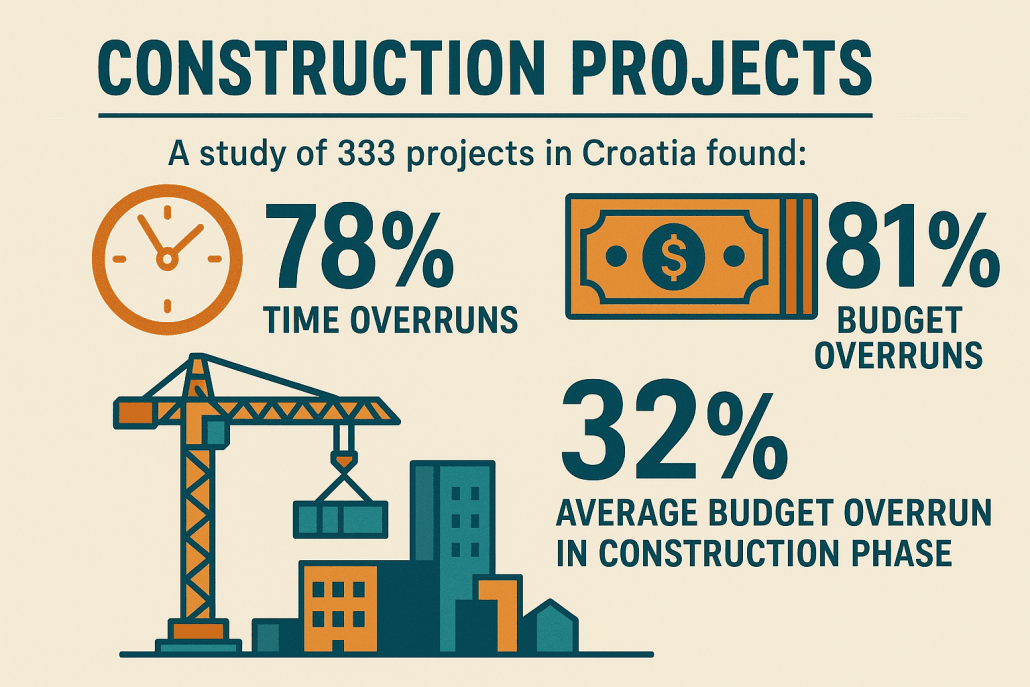
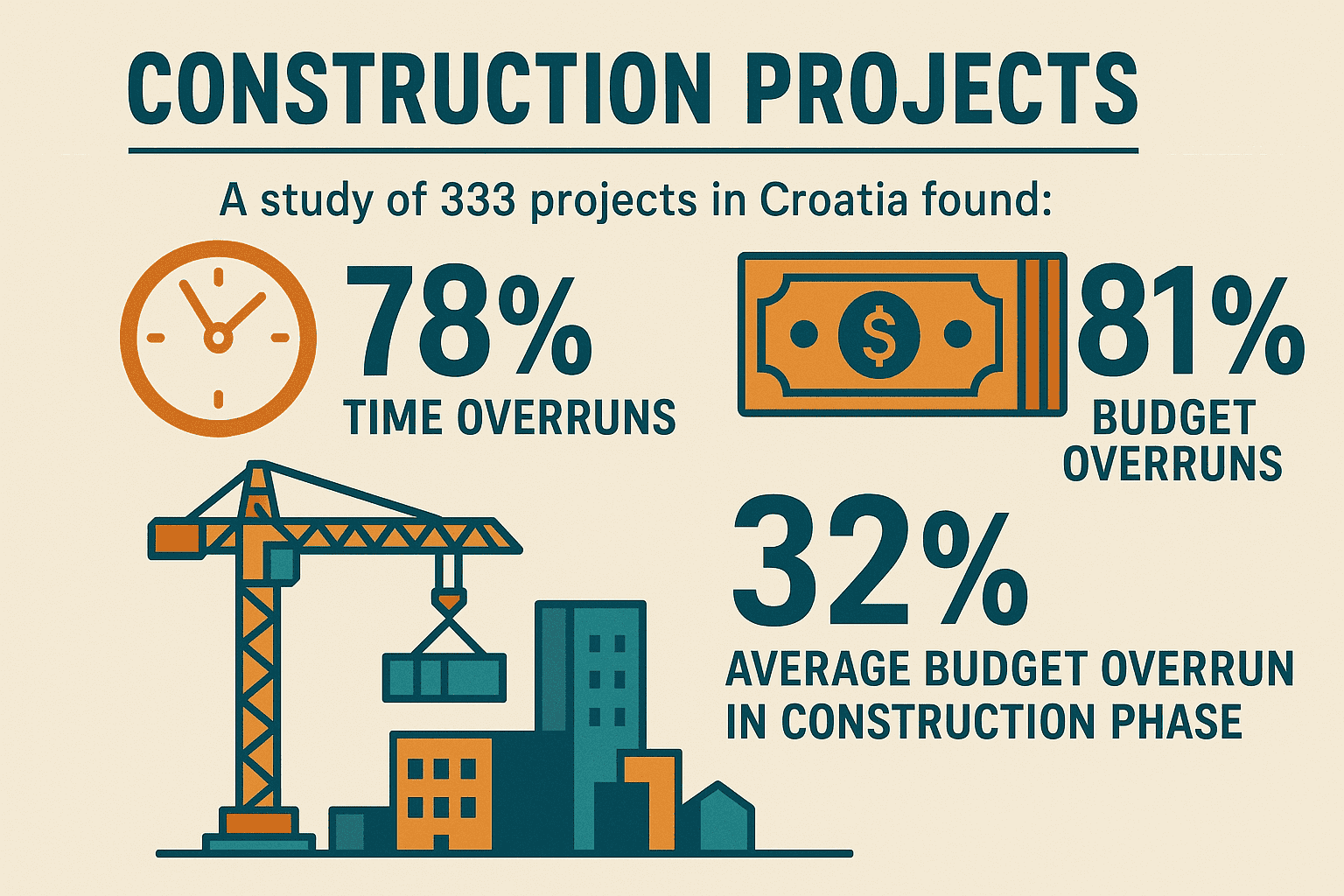
The construction industry is a symphony of controlled chaos. It’s an intricate dance of architects, engineers, contractors, subcontractors, and clients, all striving to erect complex structures from the ground up. Today, this dance is often marred by discord. Project delays are rampant, budgets spiral out of control, and communication breakdowns between the office, the site, and suppliers are tragically common. A single misplaced blueprint, a misunderstood change order, or a delayed material delivery can trigger a cascade of costly errors and disputes. Research has consistently shown the scale of this problem; a study covering 333 projects in Croatia, for instance, found that 78% of projects experienced time overruns and 81% exceeded their budgets, with an average budget overrun of 32% in the construction phase alone .
These are not mere inconveniences; they are fundamental threats to profitability and reputation. The core challenges are systemic. Construction project managers must juggle complex timelines with thousands of interdependent tasks, track the fluctuating costs of labor and materials, and ensure every stakeholder—from the lead architect to the on-site electrician—is working from the most current set of documents. This includes blueprints, Requests for Information (RFIs), submittals, and change orders. Furthermore, the need to maintain a secure, auditable, and legally defensible record of the entire project lifecycle, often for years after completion, adds another layer of complexity.
In the face of this complexity, relying on spreadsheets, email chains, and paper trails is no longer a viable strategy. It’s an invitation to failure. Modern construction firms require a central nervous system, a digital platform that brings order to the chaos. This is the role of construction project management software. These tools promise to streamline workflows, enhance collaboration, and provide real-time visibility into every facet of a project. However, the adoption of such a tool immediately presents a critical strategic decision: should you entrust your company’s most valuable data to a third-party cloud (SaaS) provider, or should you maintain full control with a self-hosted solution?
This guide argues that for many construction companies, the self-hosted model is not just an alternative, but a superior strategic choice. It is a decision that prioritizes absolute data control, robust security, deep process customization, and long-term financial prudence. We will explore why the self-hosted approach is a powerful and natural fit for the unique demands of the construction industry, what key features define a best-in-class tool, and how to select and implement the right solution for your business, with a special focus on comprehensive platforms like Kendo Manager that are engineered to meet these exact needs.
Why Self-Hosted PM Software is a Game-Changer for Construction
The decision between cloud-based Software-as-a-Service (SaaS) and a self-hosted solution is one of the most significant technological choices a modern construction firm will make. While the allure of SaaS—quick setup, no server maintenance—is strong, the unique risk profile and operational realities of the construction industry often make self-hosting a more strategic and resilient choice. This section delves into the fundamental value proposition of self-hosting, directly connecting its benefits to the specific requirements and high-stakes nature of construction projects.
Unbreakable Control Over Your Most Sensitive Data
A construction project is a data-generating machine. From the initial bid to the final handover, it produces a vast and valuable trove of sensitive information. This includes proprietary architectural plans and BIM models (intellectual property), detailed financial bids and contracts, confidential client information, and private employee data. In the wrong hands, this information could lead to competitive disadvantage, legal liabilities, and significant financial loss. Self-hosted software places a digital fortress around this data.
Data Sovereignty and Compliance: With a self-hosted solution, all project data resides on your own servers, whether they are physically on-premise or in a private cloud that you control. This principle of data sovereignty is paramount. It means you are not subject to the terms of service, data location policies, or potential security vulnerabilities of a third-party SaaS vendor. For projects involving government contracts, critical infrastructure, or clients in highly regulated industries like finance or healthcare, the ability to guarantee that data never leaves a specific jurisdiction or your own firewall is not just a benefit—it’s often a contractual requirement . This aligns with regulations like GDPR in Europe, which impose strict rules on data processing and location.
Enhanced Security Against Breaches: While major SaaS providers invest heavily in security, their large, multi-tenant platforms are high-value targets for cyberattacks. A breach at a single provider can expose the data of thousands of companies. By hosting the software behind your own corporate firewall, you bring security in-house. Your internal IT team can apply your company’s specific security policies, conduct your own audits, and manage access controls with granular precision. This creates a defense-in-depth strategy that is tailored to your organization’s risk tolerance, rather than relying on a one-size-fits-all approach from a vendor .
Long-Term Archiving and Legal Hold: Construction projects have a long tail. Legal obligations, warranty claims, and facility management needs require that project documentation be securely archived for many years, sometimes decades. With a self-hosted system, you own your data and the software license in perpetuity. You can archive projects offline, maintain them in a read-only state, and access them years later without being locked into an expensive, ongoing subscription. If a project becomes subject to a legal dispute, you can easily isolate and preserve all relevant data without needing permission or assistance from a third-party vendor.
Customization That Bends to Your Workflow, Not the Other Way Around
The construction industry is built on established processes, regional standards, and company-specific workflows that have been refined over decades. A common frustration with generic SaaS solutions is that they force companies to change their proven methods to fit the software’s rigid structure. Self-hosted software, particularly commercially supported options, often provides a greater degree of flexibility and customization.
Adapting to Industry-Specific Practices: Construction has unique documentation and process requirements that are not found in general project management. For example, maintaining a legally compliant Construction Diary (Građevinski dnevnik), managing formal Request for Information (RFI) and submittal processes, and handling complex change order approvals are core to the business. A customizable self-hosted platform can be configured to mirror these exact workflows, using familiar terminology and process steps. This reduces friction during adoption and ensures the tool supports, rather than hinders, established best practices .
Integration with Your Existing Tech Stack: Most construction firms already use a variety of software for accounting, estimating, or engineering design (CAD/BIM). A significant advantage of self-hosted solutions is the potential for deeper, custom integrations. Your IT team or a consultant can build direct connections between your project management tool and your legacy accounting system, ensuring that cost data flows seamlessly without manual double-entry. This is often impossible with closed-ecosystem SaaS platforms that only support a limited list of pre-approved integrations .
You Control the Update Cycle: SaaS vendors roll out updates on their own schedule. While often beneficial, a forced update can sometimes remove a feature your team relies on, change the user interface unexpectedly, or introduce bugs that disrupt work mid-project. With a self-hosted application, you have the power to decide when—and if—to apply an update. You can test new versions in a staging environment before rolling them out, ensuring that the transition is smooth and doesn’t interfere with critical project deadlines. This stability is a significant advantage in an industry where project continuity is paramount .
A Financially Sound Investment for the Long Haul
The financial models of SaaS and self-hosted software are fundamentally different, and for a long-term investment, the self-hosted approach often proves more economical. The global construction software market is projected to grow from $10.76 billion in 2025 to $21.03 billion by 2032, a testament to the industry’s increasing reliance on these tools . Choosing the right financial model is critical to managing this investment.

One-Time Cost vs. Perpetual Subscription: Self-hosted software like Kendo Manager is typically sold as a one-time perpetual license fee. This is a capital expenditure (CapEx) that results in owning an asset. In contrast, SaaS is a recurring operational expense (OpEx) that never ends. While the initial upfront cost of a self-hosted license may seem higher, it eliminates the endless cycle of monthly or annual payments. Over a 3-5 year period, the total cost of ownership (TCO) for a self-hosted solution is often significantly lower than a comparable SaaS subscription.
Predictable Scaling Costs: The “per-user, per-month” pricing model of SaaS can become prohibitively expensive as a company grows. Furthermore, construction projects often require granting temporary access to a fluctuating number of subcontractors, architects, and clients. With a SaaS model, each of these temporary users can add to the monthly bill, creating unpredictable costs. A self-hosted solution with a tiered user license (e.g., up to 50 users) provides a much more predictable and manageable cost structure, allowing you to add and remove users within your license limit without financial penalty.
Avoiding “Feature Creep” and Price Hikes: Many SaaS vendors employ a tiered pricing strategy where essential features for construction (like Gantt charts, cost management, or advanced reporting) are locked behind more expensive “Pro” or “Enterprise” plans. A comprehensive self-hosted solution like Kendo Manager often includes all features in a single package, providing full functionality from day one. Moreover, you are immune to the vendor’s future price hikes. Once you own the license, you are not at the mercy of annual subscription increases that can inflate your operational budget unexpectedly.
Reliability and Access, Even When the Internet Fails
The reality of a construction site is far from the pristine environment of a corporate office. Sites are often located in remote areas with poor or non-existent internet connectivity. A project management tool that relies entirely on a stable internet connection to a distant server is a tool that is destined to fail when it’s needed most.
On-Site Intranet Access: This is perhaps the most compelling operational advantage of self-hosting for construction. The software can be installed on a server located directly at the construction site trailer. This server can run on a local area network (LAN) or intranet, completely independent of an external internet connection. This means the site manager, foremen, and crews can access blueprints, update daily logs, and manage tasks reliably throughout the day. Data can then be synced with the main office server when a connection becomes available. This model provides the best of both worlds: robust on-site performance and centralized data consolidation.
You Control the Uptime: With a SaaS solution, your access to your own project data is entirely dependent on the provider’s uptime. An outage at their data center, whether due to technical failure, a cyberattack, or maintenance, means your entire company is at a standstill. When you self-host, you are in control of your own uptime. While this comes with the responsibility of maintenance, it also means that you are not vulnerable to external failures beyond your control. Your system’s reliability is in your hands, managed according to your own disaster recovery and business continuity plans.
- Total Data Ownership: Keep sensitive project data, intellectual property, and client information secure behind your own firewall.
- Customization for Real-World Workflows: Adapt the software to your specific construction processes, not the other way around.
- Superior Long-Term ROI: Avoid perpetual subscription fees with a one-time license, leading to a lower Total Cost of Ownership.
- Uninterrupted On-Site Access: Run the system on a local network at the construction site, eliminating dependency on unreliable internet connections.
Core Features: The Blueprint for a Successful Construction PM Tool
Once a construction firm decides that self-hosting is the right strategic path, the next step is to evaluate the software itself. A powerful project management tool for construction is more than just a generic task list; it’s a specialized, integrated system designed to address the industry’s unique challenges. This section outlines the essential functional building blocks—the “blueprint” of features—that a successful construction PM tool must possess, explaining each through the lens of the specific problems they solve on a daily basis.
Project Planning and Scheduling: From Gantt Charts to Critical Path
The Problem: Construction projects are notoriously complex, often involving thousands of tasks with intricate dependencies. A delay in one foundational activity, like pouring concrete, can have a domino effect, pushing back dozens of subsequent tasks and jeopardizing the entire project timeline. Managing this complexity with static spreadsheets is a recipe for disaster.
The Solution Features: A robust planning module is the heart of any construction PM software. It must provide dynamic tools to visualize and manage the project schedule.
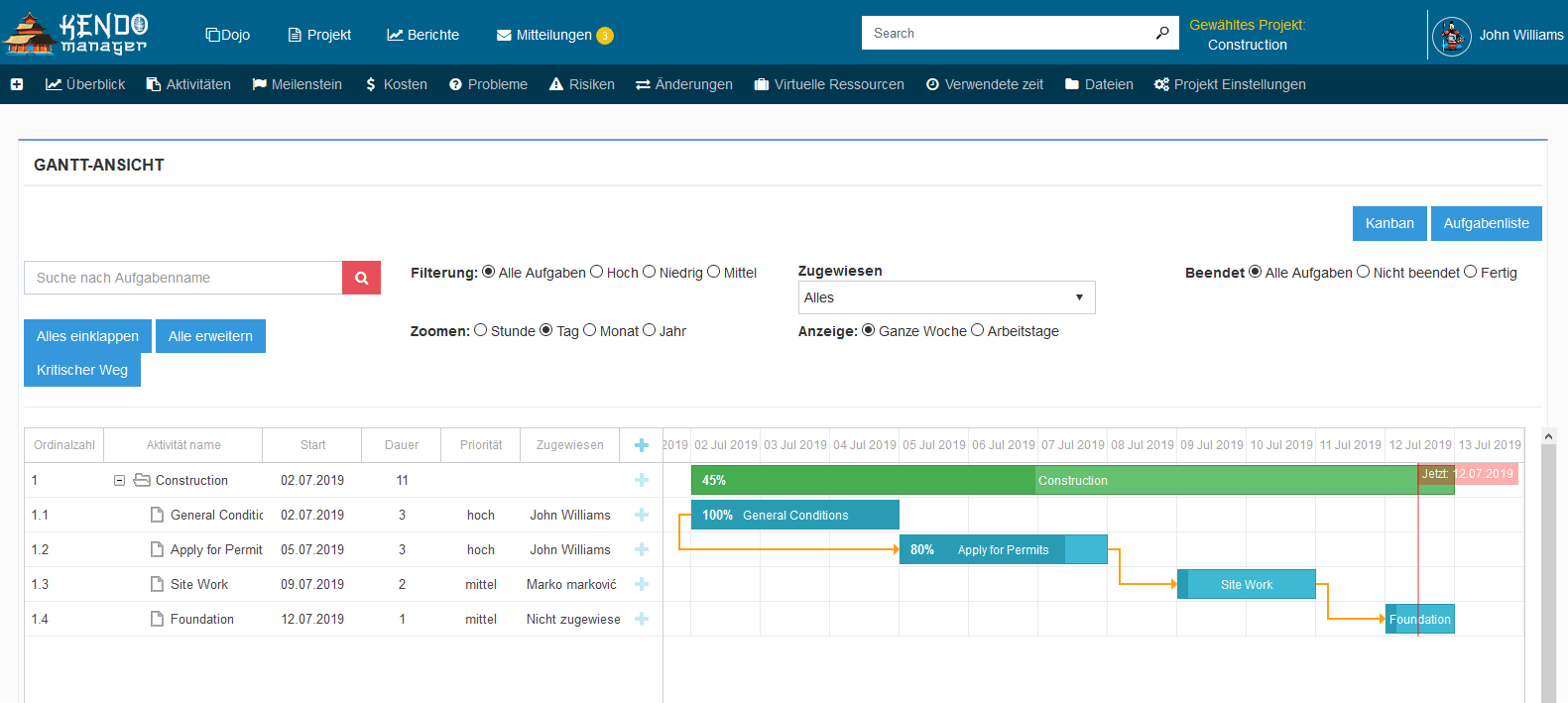
- Interactive Gantt Charts: This is a non-negotiable feature. Gantt charts provide a visual timeline of the entire project. A good implementation, as seen in tools like Kendo Manager’s scheduler, allows project managers to easily create tasks, set start and end dates, and, most importantly, establish dependencies (e.g., Task B cannot start until Task A is finished). This visual representation makes it easy to see how tasks relate to one another and to identify the project’s critical path—the sequence of tasks that determines the project’s total duration.
- Task Management & Milestones: The software must allow for the breakdown of large project phases (e.g., “Foundation,” “Framing”) into smaller, manageable tasks and subtasks. Each task should be assignable to specific individuals or teams (e.g., “Plumbing Subcontractor”), with clear deadlines and status indicators (e.g., “Not Started,” “In Progress,” “Completed”). Defining key milestones (e.g., “Building Watertight,” “Passed Electrical Inspection”) provides clear progress markers for stakeholders.
- Resource Allocation: Effective scheduling isn’t just about time; it’s about resources. The software should enable managers to assign labor (e.g., carpenters, electricians), equipment (e.g., cranes, excavators), and materials to specific tasks. This helps prevent over-allocation (scheduling one crew for two places at once) and identifies potential resource bottlenecks before they occur, ensuring a smoother workflow on site.
Cost Management and Financial Control: Keeping Budgets in the Black
The Problem: Cost overruns are the bane of the construction industry. Without real-time tracking, expenses for labor, materials, and subcontractors can quickly exceed the budget, eroding profit margins. A study on the impact of construction delays highlighted how monthly overheads and machinery costs can accumulate, turning a profitable project into a loss . Effective financial control requires a live, accurate picture of project spending.
The Solution Features: An integrated cost management module connects the project plan to the project’s finances.
- Budgeting & Estimating: The tool should allow you to set up a detailed project budget, broken down by cost codes that align with your company’s accounting practices. This initial budget serves as the baseline against which all future costs are measured.
- Expense and Time Tracking: This is where the office meets the field. The software must provide easy ways to log actual costs as they occur. This includes tracking employee timesheets against specific tasks, recording invoices from subcontractors and material suppliers, and logging equipment rental fees. Tools like Kendo Manager offer real-time tracking of actual hours worked versus planned hours, providing an early warning system for labor cost overruns.
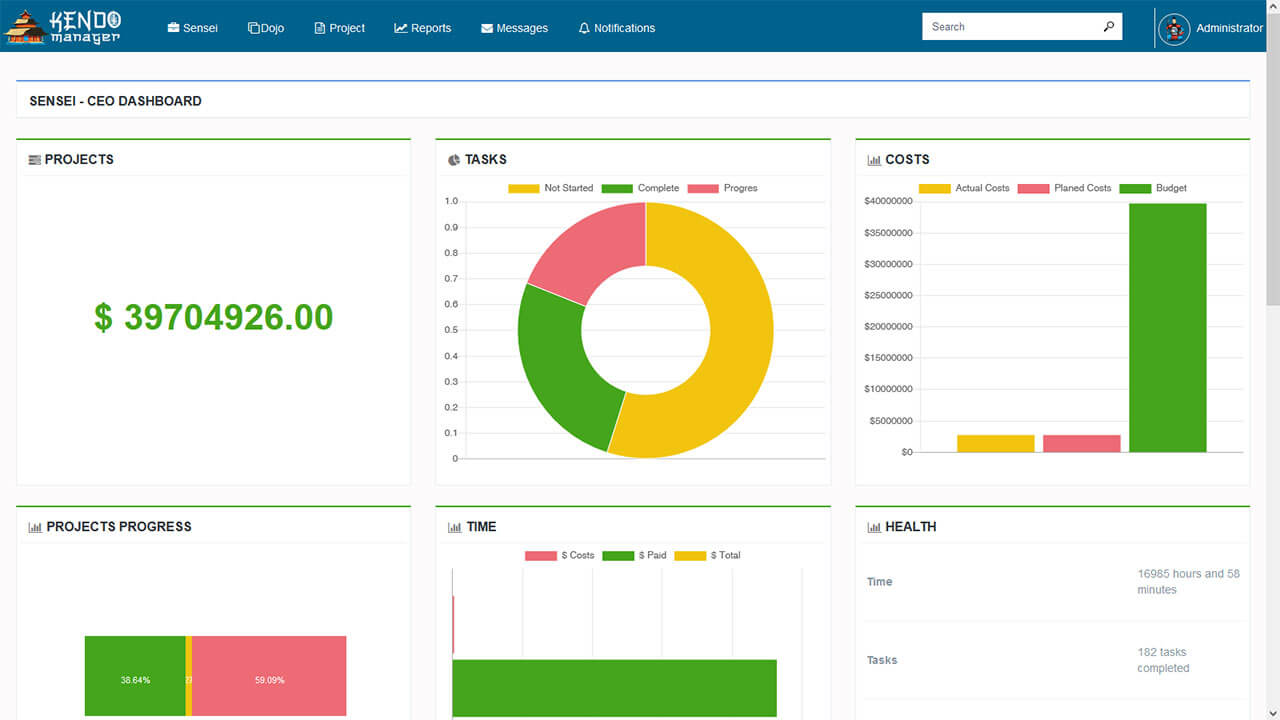
- Financial Reporting (Budget vs. Actual): The ultimate goal is visibility. The software must be able to generate instant reports comparing budgeted costs to actual expenditures. Key reports include “Budget vs. Actual,” “Cost-to-Complete,” and “Earned Value Analysis,” which provide a clear, data-driven assessment of the project’s financial health at any given moment. This allows project managers to make informed decisions and take corrective action before it’s too late.
Centralized Document Management: The Single Source of Truth
The Problem: A construction site running on outdated blueprints is a costly mistake waiting to happen. In a typical project, hundreds of documents—plans, specifications, contracts, permits, RFIs, change orders—are constantly being updated and distributed. When teams work from different versions, the result is rework, disputes, and delays. The challenge is ensuring that everyone, from the architect in the office to the foreman on site, has access to the one and only “single source of truth.”
The Solution Features: A robust document management system is the project’s central library, but with intelligent controls.
- Version Control: This is the most critical feature. When a new version of a blueprint or specification is uploaded, the system must automatically archive the old version and clearly flag the new one as current. This prevents a subcontractor from fabricating a component based on a superseded drawing, saving immense time and money.
- Secure, Centralized File Storage: The software must provide a secure, organized repository for all project-related files. This includes not just standard office documents but also large-file formats common in construction, such as CAD drawings (DWG) and Building Information Models (BIM). Platforms like VOLUM3, used on major projects, demonstrate the power of a central data environment (CDE).
- Role-Based Access Control: Not everyone needs access to everything. The system must allow administrators to set granular permissions, controlling who can view, upload, edit, and approve specific documents. For example, financial contracts may be visible only to senior management, while subcontractors can only see the plans relevant to their scope of work. This protects sensitive information and reduces clutter for users.
Team Collaboration and On-Site Communication: Bridging the Office and the Field
The Problem: The physical and communication gap between the office-based management team and the crews in the field is a major source of inefficiency. Important information gets lost in translation, questions from the site go unanswered for hours, and daily progress is poorly documented, leading to a lack of visibility and accountability.
The Solution Features: Modern PM tools bridge this gap with features designed for mobility and real-time interaction.
- Mobile Accessibility: A responsive web interface or a dedicated mobile app for smartphones and tablets is essential. Field personnel must be able to access plans, view their tasks, and submit reports directly from the job site. As noted by PlanRadar, a site manager only needs a smart device to create and access a complete digital project file.
- Daily Logs and Field Reporting: The software should make it effortless for site managers to file daily reports. This includes logging weather conditions, noting which crews were on-site, documenting work completed, and reporting any incidents or delays. This creates a detailed, contemporaneous record of site activities, which is invaluable for progress tracking and dispute resolution. The Croatian concept of a Građevinski dnevnik (Construction Diary) is a formal version of this, and digital tools can streamline its creation .
- Issue Tracking & Punch Lists (Ticketing): When a defect is found on site (e.g., a cracked window, incorrect paint color), the software should allow a user to create a “ticket” or “punch list item.” This involves taking a photo of the issue on their phone, annotating it on a digital floor plan, and assigning it directly to the responsible subcontractor. The system then tracks the issue until the subcontractor marks it as resolved and provides photographic proof, creating a closed-loop accountability system.
Risk and Issue Management: Expecting the Unexpected
The Problem: By their very nature, construction projects are fraught with risk. These can be financial (material price volatility), technical (design errors), environmental (unexpected soil conditions, bad weather), or organizational (subcontractor failure). Ignoring these risks is a gamble; proactively managing them is a hallmark of a professional operation.
The Solution Features: A dedicated module for risk and issue management formalizes the process of dealing with uncertainty.
- Risk Register: It’s crucial to distinguish between a risk and an issue. A risk is a potential problem that *might* happen. A risk register is a tool to formally identify potential risks (e.g., “Risk of delay in steel delivery”), assess their probability and potential impact, and plan mitigation strategies (e.g., “Confirm order 3 weeks in advance, identify backup supplier”). This proactive approach is a core tenet of formal project management methodologies .
- Issue Log: An issue is a risk that has materialized; it’s a problem that is happening *now*. An issue log is a formal system for tracking these problems, assigning responsibility for their resolution, and documenting the steps taken. This ensures that problems are not ignored or forgotten, but are actively managed until they are resolved. This clear distinction between risks and issues is a sign of a mature project management platform.
In-Depth Analysis: Top Self-Hosted Project Management Solutions for Construction
After establishing the strategic importance of self-hosting and the essential features required, the focus now shifts to the specific tools available in the market. While the landscape includes various open-source and commercial options, this analysis will provide a comparative overview, positioning Kendo Manager as a uniquely powerful and well-suited choice for its target audience in the construction sector.
Kendo Manager: The All-in-One, Secure Hub for Construction Projects
Kendo Manager is not a generic project management tool retrofitted for construction; it is a comprehensive, self-hosted platform designed with the core needs of technical and project-oriented industries in mind. It directly addresses the strategic and functional requirements outlined in the previous sections, making it a compelling solution for construction companies that value control, security, and long-term value.

How Kendo Manager Excels in Construction:
- Comprehensive, All-in-One Feature Set: One of Kendo Manager’s primary strengths is its completeness. It integrates all the critical modules into a single, cohesive system. This includes robust features like interactive Gantt charts and Kanban boards for task management, detailed cost and expense tracking, integrated time tracking for labor management, and powerful resource management capabilities. Unlike many SaaS competitors that charge extra for “premium” features, Kendo Manager provides a full suite of tools out of the box, eliminating the need for expensive add-ons or multiple, disconnected applications.
- Unyielding Data Security & Control: As a fundamentally self-hosted (on-premise) solution, Kendo Manager gives you the final say on your data. By deploying it on your own Windows Server, either in your office or a private cloud, you retain 100% control over data sovereignty, security protocols, and backup procedures. This is a non-negotiable for firms handling sensitive client blueprints, government contracts, or projects with strict confidentiality agreements .
- Intuitive and Accessible User Experience: Power is useless if it’s too complex to use. Kendo Manager is praised for its simple and intuitive interface, designed for project managers and team members, not just IT specialists. This focus on usability accelerates team onboarding and encourages wider adoption, ensuring the tool actually gets used in the field. The platform is accessed via a standard web browser, requiring no special client-side software installation.
- Financial Predictability with One-Time Pricing: Kendo Manager’s pricing model is a significant departure from the SaaS norm. It is offered as a one-time license fee based on user tiers, such as the Startup plan for 10 users or the Business plan for 50 users . This CapEx model provides long-term cost predictability and a demonstrably lower Total Cost of Ownership (TCO) compared to the perpetual operational expense of monthly subscriptions.
- Global Readiness with Multi-Language Support: In an increasingly globalized industry with diverse workforces, communication is key. Kendo Manager supports multiple languages, including English, German, Spanish, and several languages crucial for the Balkan region (Croatian, Serbian, Bosnian), making it an ideal choice for international projects or companies employing a multicultural team .
How Kendo Manager Stacks Up Against the Alternatives
To fully appreciate Kendo Manager’s value proposition, it’s essential to compare it directly with other categories of project management tools commonly considered by construction firms.
Kendo Manager vs. Cloud-Based Giants (e.g., Procore, PlanRadar)
Cloud-based leaders like Procore and PlanRadar offer incredibly feature-rich platforms specifically for construction. They excel at mobile access and have vast ecosystems of integrations. However, their model comes with fundamental trade-offs that Kendo Manager directly addresses.
- Kendo’s Edge: The core differentiators are data ownership and cost structure. While cloud solutions like Procore offer extensive features, your sensitive project data resides on their servers, subject to their policies. Kendo Manager gives you absolute control. Financially, the SaaS “per-user, per-month” model can become a significant and escalating operational expense, especially for large teams or projects requiring many external collaborators. Kendo Manager’s one-time license fee offers a predictable, long-term investment that is often more cost-effective. Furthermore, Kendo Manager’s ability to run on a local on-site network provides a level of offline reliability that cloud-only platforms cannot match.
Kendo Manager vs. Open-Source Options (e.g., OpenProject)
Open-source tools are attractive for their low (or no) initial cost and high degree of customizability. They are a viable option for technically proficient organizations with the resources to manage them.
- Kendo’s Edge: The key advantage is that Kendo Manager is a commercially supported, all-in-one product. While open-source tools like OpenProject provide great flexibility, they often require significant IT expertise to install, configure, and maintain. Support comes from community forums, and managing plugins and dependencies can be complex. Kendo Manager, by contrast, is a polished, integrated solution that comes with professional customer support, documentation, and free online training during the trial period. This dramatically lowers the barrier to entry and reduces the ongoing maintenance burden on your IT staff.
Kendo Manager vs. Traditional Desktop Software (e.g., MS Project)
For decades, desktop applications have been the workhorses of project planning. They are powerful for scheduling but fall short in the collaborative, real-time environment of modern construction.
- Kendo’s Edge: The primary difference is collaboration. While MS Project is a staple for project scheduling, it is fundamentally a single-user planning tool. Sharing plans and updates is often a manual process. Kendo Manager is a modern, web-based, multi-user platform designed for real-time collaboration. The entire team—from the PM in the office to the foreman on-site—can access and update the same live project data through a browser. It is a complete project execution environment, not just a planning tool.
Who is Kendo Manager For?
Kendo Manager is not trying to be the solution for everyone. It is specifically engineered for a distinct segment of the market that has a clear set of priorities. The ideal Kendo Manager user is:
A small to medium-sized construction company, engineering firm, or general contractor who needs a powerful, comprehensive, and integrated project management tool but wants to retain full control over their data, infrastructure, and budget. They prioritize long-term value and security over the fleeting convenience of SaaS and are looking for a solution that is both powerful and easy for their teams to adopt.
For these organizations, Kendo Manager represents the perfect balance: the power and collaborative features of a modern web platform combined with the security, control, and financial benefits of a traditional on-premise license. It is the ideal choice for managing complex construction projects without compromising on data ownership or succumbing to perpetual subscription fees.
A Step-by-Step Guide to Implementing Your Self-Hosted PM Software
Adopting a new project management system is a significant undertaking, but with a structured approach, it can be a smooth and transformative process. A successful implementation goes beyond simply installing the software; it involves careful planning, preparation, and a commitment to team training. This practical, actionable roadmap will guide you through the key stages of deploying a self-hosted solution like Kendo Manager.
Step 1: Define Your Requirements and Evaluate Your Processes
Before you even look at software demos, you must first look inward. The goal of this step is to create a clear blueprint of your needs, which will serve as your evaluation criteria.
Actionable Advice:
- Map Your Current Workflows: Gather your project managers, site supervisors, and administrative staff. Whiteboard your entire project lifecycle, from bidding and estimation to project closeout. Identify the biggest pain points and bottlenecks. Is it the change order approval process? Is it tracking subcontractor invoices? Is it the daily reporting from the field?
- Create a “Must-Have” vs. “Nice-to-Have” List: Based on your workflow analysis, create a prioritized list of features. “Must-haves” might include interactive Gantt charts, a centralized document repository with version control, and a mobile-friendly interface for daily logs. “Nice-to-haves” could be advanced risk analysis or integration with a specific BIM viewer.
- Assess Your Scale: Be realistic about your operational size. How many active projects do you typically run concurrently? How many internal users will need access? How many external collaborators (clients, subcontractors) might need temporary access? This will help you choose the right license tier.
- Set a Budget: Determine a realistic budget for the software, keeping in mind that a self-hosted solution is a one-time capital expenditure. Factor in the license cost as well as any potential hardware upgrades or IT time for setup.
This initial discovery phase is critical. A clear understanding of your own needs will prevent you from being swayed by flashy features you don’t need and will ensure the chosen solution genuinely solves your most pressing problems.
Step 2: Prepare Your Infrastructure
One of the main considerations for a self-hosted solution is the hardware and software environment it will run on. Fortunately, modern on-premise applications like Kendo Manager are designed to be straightforward and compatible with standard IT infrastructure.
Actionable Advice:
- Review System Requirements: The software vendor will provide a clear list of technical requirements. For Kendo Manager, this typically involves a Windows Server operating system and a standard web server/database setup. Your IT team or consultant can quickly assess if your existing servers meet these specifications or if a new one is needed.
- Decide on “On-Premise” vs. “Private Cloud”: “Self-hosted” does not necessarily mean a physical server humming away in your office closet. You have options:
- Physical On-Premise Server: You own and manage the hardware in your office. This offers maximum physical control.
- Private Cloud Server: You can rent a dedicated or virtual private server (VPS) from a hosting provider. You still control the software and data, but the provider manages the physical hardware and network. This can be a good compromise, offloading hardware maintenance while retaining full software control.
- Plan for Network Access: Determine how your team will access the system. Will it be purely on the internal office network? Or will you need to configure secure remote access (e.g., via a VPN) so that team members can log in from home or the construction site? This is a standard task for any IT professional.
Step 3: Plan for Data Migration and System Setup
With your requirements defined and infrastructure ready, it’s time for the initial setup and data migration. A phased approach is almost always the best strategy.
Actionable Advice:
- Start with a Pilot Project: Resist the temptation to roll out the new system across all your projects at once. Select one or two upcoming projects to serve as a pilot. This creates a controlled environment to test the software, refine your workflows, and identify any challenges before a company-wide deployment.
- Develop a Data Migration Plan: Identify what existing data needs to be moved into the new system. This might include client lists, project templates, or data from ongoing projects currently managed in spreadsheets. Plan how this data will be formatted and imported. Many systems offer tools to import data from common formats like CSV or Excel.
- Configure the System: Work with your team to configure the software to match your processes. This includes setting up user accounts and permissions, creating project templates, defining custom fields for your specific needs (e.g., specific cost codes), and establishing your document folder structure.
Step 4: Prioritize Team Training and Onboarding
A powerful tool is useless if the team doesn’t know how to use it effectively. Investment in training is not an expense; it is a critical factor for a successful implementation and achieving a return on your software investment.
Actionable Advice:
- Leverage Vendor Resources: Take full advantage of the training offered by the software provider. For instance, Kendo Manager offers free online training with their in-house experts during the 30-day trial period. This is an invaluable opportunity to get your key users up to speed quickly.
- Adopt a “Train the Trainer” Approach: Start by intensively training a small group of “super-users”—typically your project managers and tech-savvy team leads. They can then become internal champions and the first point of contact for training the rest of the team.
- Create Role-Specific Training: Not everyone needs to know everything. Tailor your training sessions to different roles. Site supervisors need to be experts on the mobile app and daily logs. Project managers need to master Gantt charts and cost reporting. Administrative staff need to understand invoicing and user management.
- Develop Internal Documentation: Create simple, one-page “cheat sheets” or short video tutorials for common tasks within your specific company workflow. This provides an easy reference for team members after the initial training is complete.
By following these steps, you can transform the implementation of a self-hosted project management system from a daunting challenge into a strategic initiative that empowers your team, streamlines your operations, and builds a foundation for future growth.
Conclusion: Build Your Future on a Foundation of Control and Efficiency
In the high-stakes, high-complexity world of construction, the tools you choose are not just operational aids; they are strategic assets that define your capacity for growth, profitability, and resilience. The industry is at a digital crossroads, moving away from fragmented, manual processes toward integrated, data-driven management. The central question is no longer *if* you should adopt a project management platform, but *how*.
This guide has laid out a clear and compelling case for why self-hosted project management software represents a powerful strategic choice for construction firms. We’ve seen how this model delivers unparalleled advantages that directly address the industry’s core challenges:
- Unparalleled Data Security: By keeping your most valuable intellectual property and client data on your own servers, you build a fortress of security and maintain absolute data sovereignty.
- Deep Customization: A flexible, self-hosted system adapts to your proven workflows, integrating with your existing tools and empowering your team rather than forcing them into a rigid, one-size-fits-all box.
- Long-Term Cost Savings: By opting for a one-time license over a perpetual subscription, you make a sound capital investment that yields a significantly lower total cost of ownership and frees you from unpredictable vendor price hikes.
- Operational Reliability: You gain independence from third-party outages and, crucially, ensure your teams on the ground have reliable access to critical project data, even when the internet fails.
For the construction firm seeking to escape the limitations, escalating costs, and data-sovereignty risks of the dominant SaaS model, a comprehensive self-hosted solution is the most logical and sustainable path forward. It is a declaration of independence—a commitment to owning your data, your processes, and your digital future.
The journey begins with a single, decisive step. It’s time to move beyond the chaos of spreadsheets and email and build your company’s future on a foundation of control, security, and efficiency.
Ready to take full control of your construction projects?
Download a Free 30-Day Trial of Kendo Manager
Have questions? Schedule a free online demo with our experts to discuss how Kendo Manager can be tailored to your specific needs.
Frequently Asked Questions (FAQ)
Q1: What is the main difference between self-hosted and cloud-based construction software?
A1: The primary difference is data location and ownership. With self-hosted software, you install and run the application on your own servers (either on-premise in your office or on a private cloud server you control). This gives you complete control over your data, security, and updates. With cloud-based (SaaS) software, the vendor hosts the application on their servers, and you access it via the internet, typically paying a recurring subscription fee. Your data resides with the vendor, subject to their terms and security infrastructure.
Q2: Is self-hosted software too difficult for a construction company to maintain?
A2: While it does require some IT oversight, modern self-hosted solutions like Kendo Manager are designed for straightforward installation on standard Windows Servers. The ongoing maintenance is often limited to applying periodic software updates (at your discretion) and performing regular data backups, which are typically part of a company’s standard IT procedures. For many firms, the significant benefit of full data control and long-term cost savings far outweighs the manageable maintenance effort.
Q3: How much does self-hosted project management software for construction cost?
A3: Unlike cloud software with its perpetual monthly or annual fees per user, most self-hosted solutions are sold as a one-time license fee. The price is usually tiered based on the number of users or features. For example, Kendo Manager offers several one-time payment plans, from a ‘Startup’ package for small teams to an ‘Enterprise’ solution. This model is often more cost-effective in the long run compared to paying SaaS subscriptions for 3, 5, or more years.
Q4: Can I access a self-hosted system from the construction site?
A4: Absolutely. A modern self-hosted application is accessed through a web browser. As long as your server is configured for secure remote access (e.g., through a VPN), your team can log in from any device with an internet connection, including tablets and smartphones on the job site. Furthermore, you can install the server on a local network at the site itself, guaranteeing access even with no internet connection.
Q5: What kind of support is available for self-hosted software?
A5: This varies significantly by provider. Open-source tools typically rely on community forums and user-contributed documentation. In contrast, commercial self-hosted products like Kendo Manager provide professional customer support, comprehensive online documentation, and dedicated services like free online training during the trial period. This ensures your team can get help when they need it and can effectively use the software to its full potential.
Reference
[1] Glossary of Construction Terms
[2] prekoračenja rokova i proračuna građevinskih projekata – …
[3] What is Self-Hosted Software | An Overview with Pros and …
[4] The Pitfalls of Self-Hosting
[5] eBuild – Upravljanje građevinskim projektima
[6] Self-Hosted Project Management for Better Control in 2025
[7] Construction Software Market Size, Share | Growth Report …
[8] Ultimativni vodič za upravljanje projektima
[9] Kendo Manager: Pricing, Free Demo & Features
[10] Kendo Manager Prices
[11] Construction Project Management Software Guide
[12] Primjena BIM-a na projektu izgradnje kampusa Rimac Grupe
[13] Features
[14] OpenProject – Open Source Project Management Software
[15] Softver za upravljanje građevinskim projektima = manje …
[16] Benefits of Project Management Schedule

