
The Complete Guide to Self-Hosted Project Management for 2026

What Is Self-Hosted Project Management? (2026 Definition)
Self-hosted project management refers to project management software deployed on an organization’s
own infrastructure—on-premise, on local servers, in a private cloud, or inside secure network
boundaries. Unlike SaaS tools, which store data on third-party servers, self-hosted systems give
organizations total authority over:
- data storage and retention
- security configurations
- access controls
- compliance enforcement
- infrastructure design
- backup and recovery
This model makes self-hosted project management especially relevant in industries where data privacy, compliance, and operational reliability are non-negotiable.
Key Characteristics in 2026
- Full Data Ownership – No external storage or vendor access.
- Enterprise Security – Total control over firewalls, encryption, and access.
- Compliance-Ready – Supports GDPR, NIS2, ISO 27001, HIPAA and other regulations.
- Customizable Architecture – Tailored for specific workflows and industries.
- Predictable Cost Model – No per-user SaaS inflation.
Self-Hosted Project Management Trends for 2026
The 2026 landscape is shaped by new regulations, AI advancements, and enterprise security demands. Several key trends define how organizations think about self-hosted project management this year.
AI-Powered Automations with Local Data Processing
AI-driven features are now considered standard expectations in project management tools. In 2026, the
critical difference is where AI runs. Organizations want:
- AI scheduling and forecasting that runs on internal servers
- risk scoring through Monte Carlo simulations
- automated status summaries and project reports
- intelligent task prioritization and workload recommendations
All of this must happen without sending sensitive data to external cloud models, making
local or on-premise AI a key requirement.
Compliance-Driven Adoption
Privacy and security regulations such as GDPR, NIS2, HIPAA, and ISO 27001 are becoming stricter. Many organizations simply cannot use public cloud services for mission-critical or sensitive data.
Self-hosted solutions make it easier to:
- control where data is stored
- demonstrate compliance to regulators and auditors
- manage retention policies and legal archiving
- implement custom security and access rules
Deep Internal Integrations
In 2026, project management platforms must connect seamlessly with:
- identity systems (Active Directory, LDAP)
- SSO providers (SAML, OAuth)
- ERP, CRM, WMS, MES systems
- internal microservices and APIs
- DevOps pipelines and private Git repositories
Self-hosted tools make such integrations significantly easier, because they live inside the same network and infrastructure as other core systems.
Portfolio, Resource, and Multi-Project Visibility
Enterprise organizations rarely manage a single project. They need:
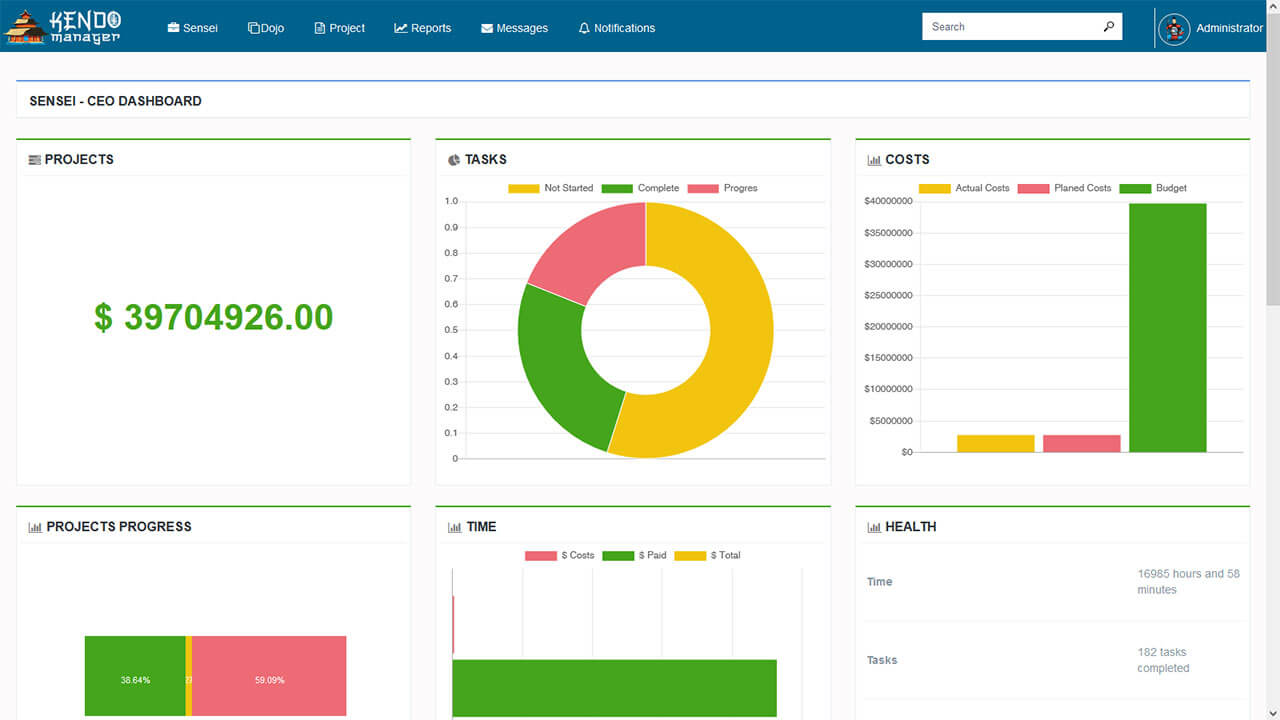
- multi-project dashboards
- cross-team resource planning
- portfolio-level reporting and risk summaries
- executive-level views for leadership
Self-hosted platforms that provide strong Gantt, resource, and portfolio tools are best positioned to
support these needs in 2026.

Privacy-First Digital Strategy
Governments, public institutions, and larger enterprises are increasingly adopting privacy-first and
sovereignty-focused IT strategies. This often includes:
- running critical systems on national or internal infrastructure
- avoiding foreign cloud vendors for sensitive workloads
- maintaining full legal control over all operational data
Local-First AI Assistants
Local-first AI—AI models running within an organization’s infrastructure—has emerged as a major trend.
These assistants:
- help generate reports and summaries
- analyze risk and capacity
- offer next-step recommendations
- operate without exposing data to third parties
Self-Hosted vs Cloud Project Management Tools: Full 2026 Comparison
Choosing between self-hosted and cloud-based project management tools is one of the most important IT
decisions organizations face in 2026. While cloud tools offer fast onboarding and a fully managed
experience, self-hosted platforms deliver superior control, security, and long-term value.
| Criteria | Self-Hosted | Cloud SaaS |
|---|---|---|
| Data Ownership | ⭐⭐⭐⭐⭐ | ⭐ |
| Security | ⭐⭐⭐⭐⭐ | ⭐⭐ |
| Compliance | ⭐⭐⭐⭐⭐ | ⭐⭐ |
| Cost Efficiency (3–5 years) | ⭐⭐⭐⭐ | ⭐⭐ |
| Customization | ⭐⭐⭐⭐⭐ | ⭐ |
| Integrations (Internal) | ⭐⭐⭐⭐⭐ | ⭐⭐ |
| Offline / Intranet Capability | ⭐⭐⭐⭐⭐ | ⭐ |
In 2026, self-hosted project management clearly stands out for organizations that prioritize data protection, compliance, and operational independence.
Benefits of Self-Hosted Project Management in 2026
Complete Data Ownership
All project data—tasks, files, comments, time logs, resource plans—stays inside your own infrastructure. No third-party vendor can access or process your information.
Enterprise Security and Governance
With self-hosted systems, organizations apply their own security measures:
- firewall policies
- advanced encryption
- network segmentation
- custom access protocols
- intrusion detection and prevention
This leads to stronger security than relying solely on a vendor’s standardized approach.
Compliance Alignment
Self-hosted project management fits naturally into compliance-driven environments. Organizations can
align the platform with:
- GDPR
- NIS2
- ISO 27001
- HIPAA
- sector-specific regulations
Predictable Long-Term Costs
Instead of per-user monthly subscriptions, self-hosted solutions typically offer one-time or annual licensing. Over a period of several years, this creates substantial savings compared to cloud SaaS.
Unlimited Customization
Self-hosted platforms can be configured to match your exact workflows:
- custom fields and statuses
- tailored approval flows
- unique reporting structures
- specific role hierarchies
High-Quality Integrations
Because the platform runs within your network, it can connect deeply with:
- ERP, CRM, WMS, MES systems
- identity and access services
- document management systems
- DevOps and CI/CD pipelines
Offline and Intranet-Only Operation
Self-hosted project management tools can function in fully offline or restricted environments, which is critical for:
- government and public institutions
- industrial plants and manufacturing
- defense, utilities, and critical infrastructure
Key Features Every Self-Hosted PM Tool Should Have in 2026
To meet modern expectations, a self-hosted project management platform in 2026 should provide:
- Advanced Gantt Charts with dependencies, baselines, and critical path.
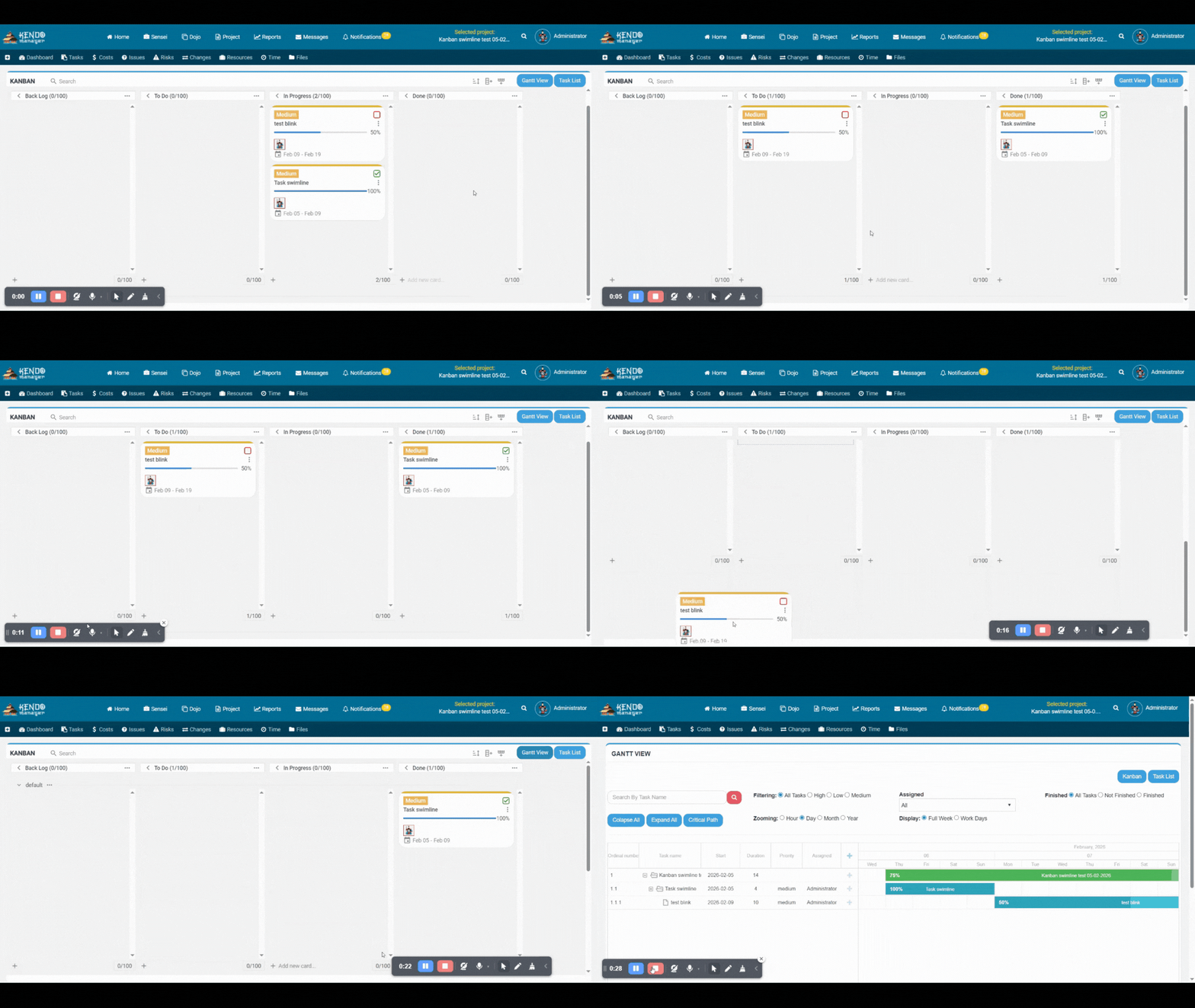
- Kanban Boards for Agile and hybrid workflows.
- Resource and Capacity Planning across multiple projects.
- Portfolio and Multi-Project Management for executives and PMOs.
- Role-Based Access Control (RBAC) for granular permissions.
- Detailed Reporting and Analytics with exportable dashboards.
- Secure File Storage and Versioning for documents and attachments.
- Extensive Integration Capabilities with internal systems and APIs.
- Local AI Automation for planning, reporting, and risk analysis.
Common Use Cases for Self-Hosted Project Management in 2026
Government and Public Sector Institutions
Governments and public agencies often must comply with strict data sovereignty laws and cannot store
sensitive project information in foreign clouds. Self-hosted project management ensures:
- internal hosting of all project data
- audit trails for public accountability
- compliance with national regulations
- secure collaboration between departments
Construction, Engineering, and Infrastructure
Large construction and engineering firms deal with complex timelines, multiple contractors, and field
environments with limited connectivity.
Self-hosted PM tools support multi-project scheduling, resource planning, and offline or intranet-only
access, making them ideal for site-based operations.
Manufacturing and Industrial Production
Manufacturers benefit from self-hosted PM systems that integrate with ERP, MES, and WMS platforms, allowing:
- synchronized production and project planning
- maintenance scheduling
- process optimization
Banks, Insurance Companies, and Financial Institutions
Financial institutions handle sensitive transaction data, customer information, and confidential internal projects. Self-hosted tools help meet the highest security and audit standards while keeping project data in-house.
Healthcare, Pharmaceuticals, and Research
Healthcare providers and research organizations need to coordinate projects under strict privacy regulations. Self-hosted project management allows them to track clinical studies, equipment upgrades, and cross-team initiatives without exposing sensitive data to external clouds.
IT and Software Teams with Privacy or Security Requirements
Development teams that work on confidential products or operate in high-security environments often need their project management tools to live inside the same protected infrastructure as their code and CI/CD pipelines.
High-Security and Offline Environments
Defense organizations, utilities, critical infrastructure operators, and emergency services frequently require solutions that can run entirely offline or on isolated networks. Self-hosted platforms are uniquely suited to these scenarios.
Kendo Manager: A Leading Self-Hosted PM Solution for 2026
Kendo Manager has emerged as a powerful and versatile self-hosted project management solution for organizations that need full control over their infrastructure and data. It combines advanced planning tools with enterprise-grade security and flexible deployment options.
Built for Full Data Ownership
Kendo Manager runs entirely within your IT environment. All project data is stored on your servers, making it ideal for organizations that require strict control over information governance and compliance.
Enterprise-Level Security and Governance
Because it is self-hosted, Kendo Manager enables organizations to apply their own security standards, from encryption and firewalls to advanced access controls and auditing.
Powerful Gantt, Kanban, Resource, and Portfolio Tools
Kendo Manager includes:
- interactive Gantt charts with dependencies and baselines
- Kanban boards for Agile and hybrid teams
- resource management for capacity and workload planning
- portfolio management for multi-project oversight
Multi-Language Support
With support for multiple languages, Kendo Manager is well suited for international teams and global organizations.
Flexible Deployment Options
Kendo Manager can be deployed on:
- Linux and Windows servers
- Docker environments
- Plesk-based hosting
- on-premise or private cloud infrastructure
Transparent, Predictable Licensing
Kendo Manager uses clear licensing models without per-user monthly pricing. This is especially attractive
for organizations with larger teams and long-term project horizons.
Kendo Manager vs Other Self-Hosted PM Tools (2026 Comparison)
Several self-hosted project management solutions exist in the market. Kendo Manager distinguishes itself by combining enterprise capabilities, usability, and predictable pricing.
| Feature | Kendo Manager | OpenProject | Redmine | Taiga | Jira Data Center |
|---|---|---|---|---|---|
| Gantt + Resource Tools | ⭐⭐⭐⭐⭐ | ⭐⭐⭐⭐ | ⭐⭐ | ⭐ | ⭐⭐⭐ |
| Ease of Use | ⭐⭐⭐⭐⭐ | ⭐⭐⭐ | ⭐⭐ | ⭐⭐⭐⭐ | ⭐⭐ |
| Enterprise Readiness | ⭐⭐⭐⭐⭐ | ⭐⭐⭐⭐ | ⭐⭐ | ⭐⭐ | ⭐⭐⭐⭐ |
| Modern UI | ⭐⭐⭐⭐⭐ | ⭐⭐⭐ | ⭐⭐ | ⭐⭐⭐⭐ | ⭐⭐⭐ |
| Cost Efficiency | ⭐⭐⭐⭐⭐ | ⭐⭐⭐⭐⭐ | ⭐⭐⭐⭐⭐ | ⭐⭐⭐⭐⭐ | ⭐ |
How to Implement a Self-Hosted PM Platform in 2026
Step 1 — Choose Your Hosting Environment
Decide whether to deploy on on-premise servers, private cloud infrastructure, Docker, Plesk, or virtual machines. The right choice depends on compliance requirements, IT policies, and team size.
Step 2 — Prepare System Requirements
Typical requirements include sufficient CPU, RAM, SSD storage, and a supported operating system (Linux or Windows), along with a database server such as MySQL or MariaDB.
Step 3 — Install the Application
Installation options usually include manual server setup, Docker-based deployment, or automated installers via panels like Plesk.
Step 4 — Configure the Database
Optimize the database for reliability and performance, enable automated backups, and ensure proper encoding and connection limits.
Step 5 — Apply Security and Access Controls
Set up HTTPS, firewalls, secure authentication, and role-based access controls. For larger organizations, integrate with AD/LDAP and SSO.
Step 6 — Customize the Application
Configure workflows, roles, project templates, and automation that match your internal processes and methodologies.
Step 7 — Integrate Internal Systems
Connect the platform to ERP, CRM, DMS, internal APIs, and DevOps tools for a unified digital ecosystem.
Step 8 — Set Up Maintenance and Monitoring
Implement regular backups, system updates, health monitoring, and performance tuning routines to ensure stability over time.
Pricing Models for Self-Hosted Project Management in 2026
Perpetual Licensing
A one-time purchase that provides long-term usage rights. This model offers excellent ROI for larger teams and long-term deployments.
Annual Licensing
Yearly access that includes updates and support. This model suits growing companies and organizations that want predictable budgeting.
Hybrid Self-Hosted Subscriptions
Some vendors offer self-hosted versions under a subscription model. This can be convenient for small teams but less efficient at scale.
Infrastructure Costs
Organizations must consider server, storage, and administration costs. Even with these, self-hosted PM tools typically cost significantly less over several years than SaaS subscriptions for medium and large teams.
Case Studies: Why Organizations Choose Self-Hosted in 2026
Government Agency Securing Data Sovereignty
A government institution needed to manage digital transformation projects while complying with strict national data sovereignty rules. Self-hosted PM allowed all project-related data to remain within national IT infrastructure, satisfying both regulatory and operational needs.
Engineering Firm Improving Multi-Project Coordination
A large engineering company replaced multiple cloud subscriptions with a single self-hosted platform that unified project timelines, resource planning, and reporting. This led to better visibility and reduced annual software costs.
Financial Institution Strengthening Control
A financial services firm adopted a self-hosted PM system to manage internal initiatives under strict security and audit control. Integration with internal identity management and full audit trails was a key factor in the decision.
Manufacturing Company Integrating ERP and PM
A manufacturing company connected its self-hosted PM solution directly to ERP and MES systems, improving coordination between production, maintenance, and project teams.
Healthcare Organization Protecting Sensitive Data
A healthcare provider implemented self-hosted project management to coordinate clinical and infrastructure projects while ensuring compliance with HIPAA and GDPR.
Risks and Challenges of Self-Hosted Project Management in 2026
Need for Internal IT Expertise
Self-hosted solutions require in-house skills to manage servers, databases, backups, and security configurations. Organizations without a dedicated IT team may find this challenging.
Responsibility for Infrastructure
Uptime and performance depend on your own infrastructure. Hardware failures, network issues, and capacity planning are your responsibility.
Security Configuration
Misconfigured firewalls, weak TLS settings, or missing patches can introduce risks. Proper security governance is essential.
Longer Initial Setup Time
Compared to instant sign-up for cloud tools, deploying a self-hosted solution involves planning, installation, and configuration work.
Ongoing Maintenance
Self-hosted platforms require regular updates, patches, monitoring, and occasional upgrades. However, for most enterprises, these requirements are manageable and outweighed by the benefits.
Final Recommendations self-hosted project management for 2026
You should strongly consider self-hosted project management if your organization:
- handles sensitive or regulated data
- must comply with strict privacy and security regulations
- wants to avoid vendor lock-in and recurring subscription inflation
- needs deep integration with internal systems
- operates in offline or restricted-network environments
- requires highly customized workflows and governance
Cloud-based tools still make sense for small, non-regulated teams that want quick setup and minimal technical overhead. However, as teams grow and requirements become more complex, self-hosted project management offers superior long-term value and control.
Self-hosted project management software – your strategic choice
Self-hosted project management has become a strategic choice in 2026 for organizations that prioritize
privacy, reliability, and complete control over their data. As regulations tighten, AI usage increases, and cloud costs rise, secure and flexible self-hosted solutions are becoming the new standard for serious project work.
Kendo Manager stands out as a modern, self-hosted project management platform designed to
meet these demands. With powerful planning tools, enterprise security, flexible deployment, and transparent licensing, it offers a future-proof foundation for organizations that want to manage projects with confidence in 2026 and beyond.
FAQ — Self-Hosted Project Management (2026)
1. What is self-hosted project management?
It is project management software that you install and run on your own servers or private infrastructure, instead of using a vendor’s cloud.
2. Is self-hosted project management more secure than cloud?
In most regulated environments, yes. Self-hosted solutions let you control all aspects of security, including who has access, how data is stored, and which policies apply.
3. Do self-hosted tools support AI in 2026?
Yes. Many modern self-hosted tools provide AI-powered features that run locally or within your infrastructure to preserve data privacy.
4. Which industries benefit most from self-hosted PM?
Government, healthcare, finance, manufacturing, engineering, defense, and any organization that deals with sensitive or regulated data.
5. Is self-hosted PM more expensive than cloud?
Not in the long term. While there are initial setup and infrastructure costs, self-hosted platforms usually cost significantly less than per-user SaaS subscriptions over several years.
6. Can a self-hosted PM system run offline?
Yes. Self-hosted tools can be deployed on intranets or fully isolated networks, making them ideal for high-security environments.
7. What hardware do I need?
Requirements vary by tool and team size, but typically include a Linux or Windows server with sufficient CPU, RAM, and SSD storage, plus a relational database like MySQL or MariaDB.
8. Can self-hosted PM tools integrate with ERP or SSO?
Yes. Self-hosted platforms often support integration with ERP, CRM, DMS systems as well as AD/LDAP and Single Sign-On providers.
9. Is Kendo Manager fully self-hosted?
Yes. Kendo Manager runs entirely on your infrastructure, giving you full control over project data, security, and access.
10. Is self-hosted project management better for large teams?
Generally, yes. As the number of users grows, the cost advantages and flexibility of self-hosted solutions become more significant compared to per-user SaaS subscriptions.
11. How difficult is it to install a self-hosted PM tool?
Modern platforms provide installation guides, Docker images, and automated installers that simplify deployment even for smaller IT teams.
12. Does self-hosted project management help with compliance?
Yes. Self-hosted systems give organizations the control they need to meet regulatory and compliance requirements, including data residency, logging, and access control policies.

